


Last Updated on June 30, 2026 by Ewen Finser
Digits built its reputation on real-time financial intelligence, giving founders and operators a clean, AI-assisted window into their company’s money.
It’s elegant, fast, and purpose-built for startups that want clarity without complexity. But depending on your business size, budget, or how hands-on you want your bookkeeping workflow to be, it may not be the right long-term fit.
This guide breaks down five of the most competitive accounting platforms on the market today, comparing them across the factors that matter most: ease of use, core features, pricing, and how well they scale as your business grows.
At A Glance: Puzzle, QuickBooks, Xero, FreshBooks, and Wave
For folks who just need a quick skim, here’s today’s lineup summarized.
Platform | Best For | Starting Price | Biggest Strength | Main Drawback |
Startups, SaaS companies, and founders who want automated accrual accounting | Free plan; paid plans from $60/month | Modern, AI-forward accounting with startup-focused integrations like Stripe, Mercury, Ramp, Brex, and Gusto | Newer platform with a smaller accountant network than QuickBooks or Xero | |
Established small businesses that need deep features and accountant support | From $38/month | Broadest feature set, strong reporting, payroll, inventory, and the largest accountant ecosystem | More expensive and can feel cluttered for non-accountants | |
Small businesses with international needs or owners managing their own books | From $25/month | Clean interface, unlimited users, strong bank reconciliation, and 1,000+ app integrations | Entry plan limits invoices and bills; payroll requires an add-on | |
Freelancers, consultants, agencies, and service businesses | From $23/month | Excellent invoicing, time tracking, recurring billing, and client management | Client caps and limited fit for inventory-heavy or complex businesses | |
Solopreneurs, freelancers, and micro-businesses on a tight budget | Free plan; Pro plan $19/month | True free accounting and invoicing tools with a simple learning curve | Limited scalability and fewer modern automation features |
Puzzle
Puzzle is a cloud-based accounting platform built from the ground up for startups and growing tech companies.
Unlike legacy accounting tools that bolt on AI features as an afterthought, Puzzle was designed with automation at its core by using machine learning to handle transaction categorization, reconciliation, and financial statement generation with minimal manual input.
Its interface is clean and modern, and it supports both cash and accrual accounting natively, which matters a great deal for startups navigating investor reporting or fundraising.
Best For
Seed-stage to Series A startups, SaaS companies, and founders who want real-time visibility into burn rate, runway, and revenue without hiring a full-time bookkeeper on day one.
Key Features
Puzzle connects directly with tools in the modern startup stack.
Tools such as Stripe, Mercury, Ramp, Brex, and Gusto, among others connect natively and can auto-import transactions with up to 98% categorization accuracy. It generates cash and accrual financial statements automatically and includes a variance analysis tool that flags anomalies in your books before your accountant ever opens them. Higher tiers add department-level tracking, classes, projects, AI-powered accuracy reviews, and subledger support for more complex operations.
Pricing
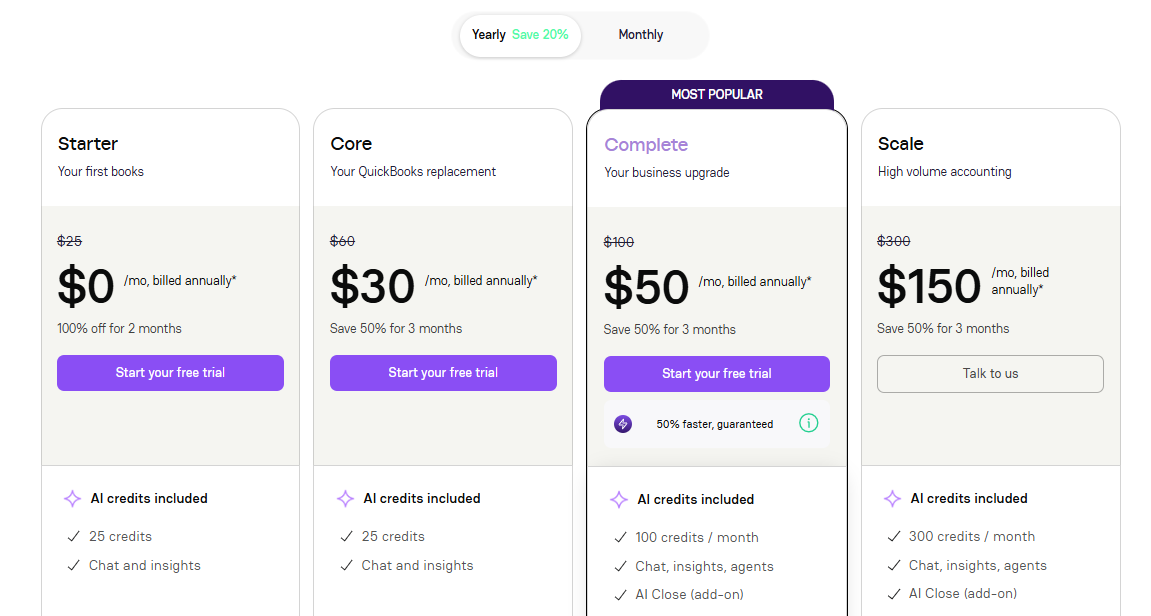
Puzzle offers a free Starter plan for businesses, which is a genuinely useful on-ramp for early-stage companies. Paid plans start at $60/month (Core) and go up to $100/month (Complete, the most popular tier) and $300/month (Scale), all billed annually. Given the automation on offer, these prices sit well below what you’d pay for manual bookkeeping services.
Pros
- The free tier provides real accounting functionality, not just a stripped-down demo, making it accessible to early-stage founders before revenue materializes.
- Native support for accrual accounting and integrations with modern fintech tools sets it apart from platforms that still treat bank-feed reconciliation as cutting-edge.
Cons
- The platform is newer than legacy competitors, which means the accountant ecosystem and third-party integration library are still maturing compared to QuickBooks or Xero.
- Reporting depth and payroll features may require supplementary tools for larger or more complex organizations.
QuickBooks Online

QuickBooks Online is the most widely used small business accounting software in the United States, and for good reason.
Intuit has spent decades building a platform that covers virtually every accounting need a growing business might have: invoicing, payroll, inventory, project profitability, tax prep, and more. It’s the platform most accountants and bookkeepers already know, which simplifies collaboration and handoffs considerably.
Best For
Established small to mid-size businesses that need a feature-rich accounting platform with broad accountant support, extensive third-party integrations, and the confidence that comes from industry-standard adoption.
Key Features
QuickBooks Online includes full double-entry accounting, customizable invoicing, automated bank feeds, accounts payable and receivable, sales tax tracking, and multi-currency support on higher tiers. The Advanced plan adds custom reporting, batch invoicing, revenue recognition, and support for up to 25 users. Intuit has also been rolling out AI-powered tools under its “Intuit Intelligence” umbrella, including automated transaction categorization and smart financial insights that help close the gap with newer AI-native competitors.
Pricing
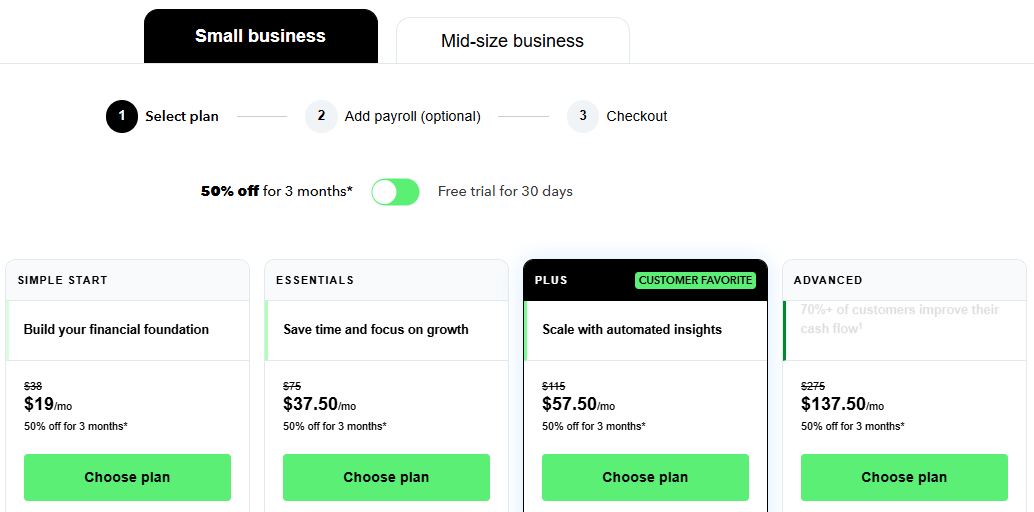
QuickBooks Online plans run from $38 to $275/month at regular pricing. Promotional discounts and trial periods are frequently available, though the platform is notably more expensive than most alternatives on this list. This is a recurring point of friction for cost-conscious small businesses, as well as myself.
Pros
- The depth of features and the size of the QuickBooks accountant network make it the most versatile and widely supported accounting platform available, period.
- Robust reporting, inventory tracking, and payroll integration make it a genuinely one-stop shop for most SMB accounting needs.
Cons
- Pricing has increased significantly in recent years, and the cost can feel steep for small businesses that only use a fraction of the available features.
- The interface, while functional, is less intuitive than newer competitors and can feel cluttered for users who don’t have accounting backgrounds.
Xero
Xero is a cloud-based accounting platform originally built in New Zealand that has earned a strong following among small businesses globally, particularly in the UK, Australia, and increasingly the US. It’s known for a genuinely clean, accessible interface and a strong emphasis on bank reconciliation workflows. Xero is especially popular among business owners who handle their own books day-to-day and want an accounting tool that doesn’t require an accounting degree to operate.
Best For
Small businesses and sole traders with international operations, businesses with a non-accountant owner managing the books, and companies that prioritize UI simplicity alongside solid core accounting features.
Key Features
Xero’s core includes unlimited users on all plans (a notable differentiator from QuickBooks), bank reconciliation with smart transaction matching, customizable invoicing and quotes, bill management, and real-time cash flow dashboards. The Established plan adds multi-currency support, expense claims, and project tracking. Xero also maintains a large app marketplace with 1,000+ integrations across payroll, inventory, CRM, and e-commerce tools.
Pricing
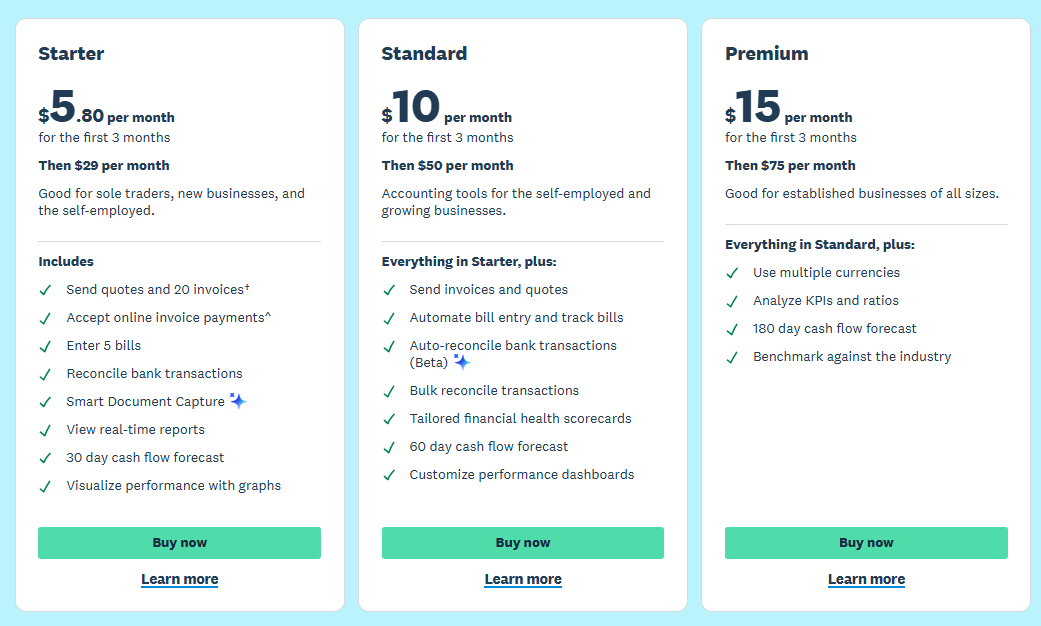
Xero’s regular pricing runs $25 to $90/month. The Early plan limits the number of invoices and bills you can send each month, which pushes growing businesses toward the mid-tier fairly quickly, in my experience. Xero frequently runs promotional introductory pricing, so first-year costs can be substantially lower than the standard rates.
Pros
- Unlimited users across all pricing tiers is a meaningful advantage for small teams who need to give multiple people access to the books without paying per seat.
- The interface is widely praised for being intuitive enough for business owners who aren’t accountants, reducing the learning curve significantly.
Cons
- The Early plan’s invoice and bill limits can feel restrictive and force users into higher tiers sooner than expected.
- Payroll is not natively included and requires a third-party add-on, which adds cost and complexity for businesses that need it.
FreshBooks

FreshBooks started its life as an invoicing tool for freelancers and has steadily evolved into a full-featured accounting platform for service-based small businesses. It still carries that DNA though, as the invoicing and client management experience is arguably the most polished on this list, but it now covers double-entry accounting, expense tracking, project profitability, and basic reporting in a package that prioritizes ease of use above all else.
Best For
Freelancers, consultants, agencies, and service-based businesses where client invoicing, time tracking, and project billing are the accounting priority.
Key Features
FreshBooks includes customizable invoices with automated payment reminders, time tracking built directly into the platform, project management and profitability reporting, recurring billing, and client retainers. Its expense tracking allows receipt capture via mobile. For those who need payroll, it’s available as an add-on through a partnership. Double-entry accounting and more formal financial statements are available on Plus and higher tiers, making it a viable full accounting solution rather than just an invoicing tool.
Pricing
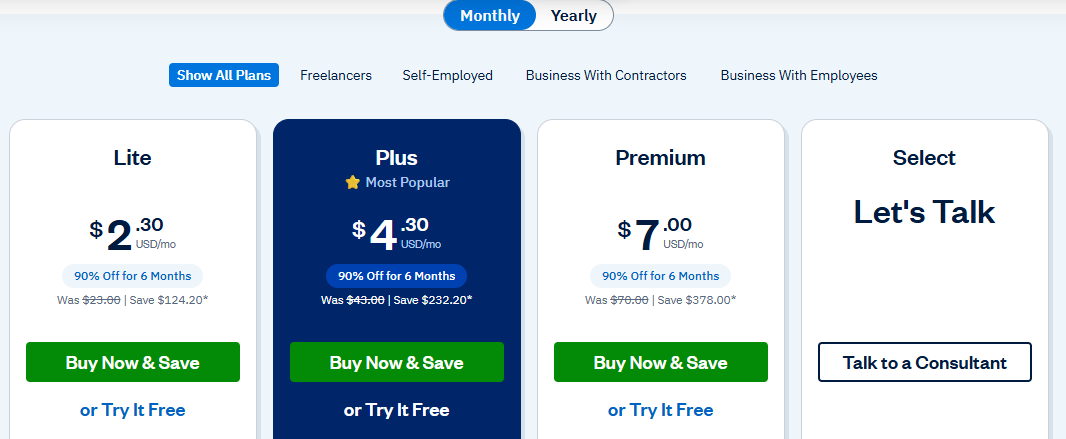
FreshBooks plans are priced at anywhere from $23 to $70 per month. Additional team members cost $11/month per user.
The client caps on lower tiers are the most significant constraint as businesses with large client rosters will need to plan for the cost of a higher plan from the outset.
Pros
- The invoicing experience is best-in-class, with automated payment reminders, client portals, and recurring billing that genuinely save time for service businesses.
- Time tracking is built natively into the platform rather than bolted on, which makes project billing significantly cleaner than piecing together separate tools.
Cons
- The client caps on lower tiers can feel limiting and force upgrades earlier than expected for businesses with diverse or expanding client bases.
- FreshBooks is optimized for service businesses so businesses with inventory, complex revenue recognition, or manufacturing needs will find it lacks the depth they require.
Wave
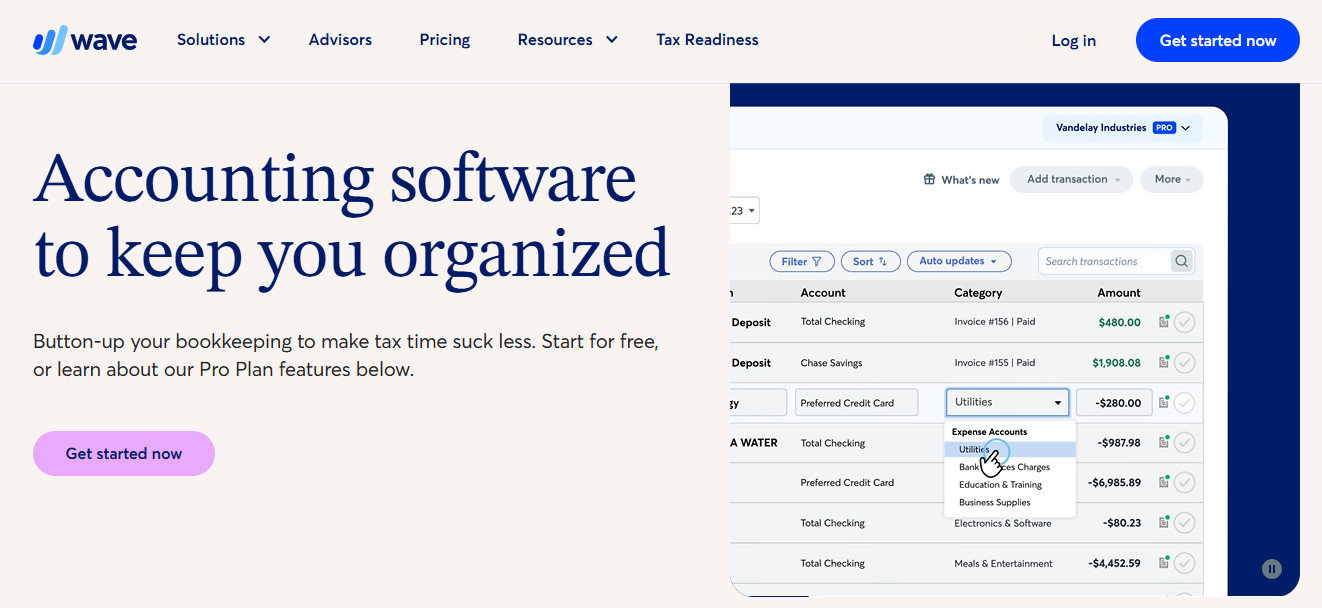
Wave is a freemium accounting platform owned by H&R Block that has long been the go-to recommendation for very small businesses and solopreneurs who need basic accounting functionality at little to no cost. Its free Starter plan covers the fundamentals of invoicing, expense tracking, and bookkeeping records without requiring a credit card or subscription. For businesses at the earliest stages, this is a meaningful on-ramp.
Best For
Solopreneurs, freelancers, and micro-businesses that need basic accounting and invoicing features without paying a monthly subscription fee, and who don’t yet need advanced reporting, multi-user access, or scalable workflows.
Key Features
Wave’s free plan includes unlimited invoicing and estimates, bill tracking, and basic cash flow management.
The paid Pro plan adds automatic bank transaction import, auto-categorization, unlimited receipt capture, and late payment reminders.
Wave Advisors, a premium add-on service, connects users with a dedicated bookkeeper for those who want professional oversight without hiring full-time.
Pricing
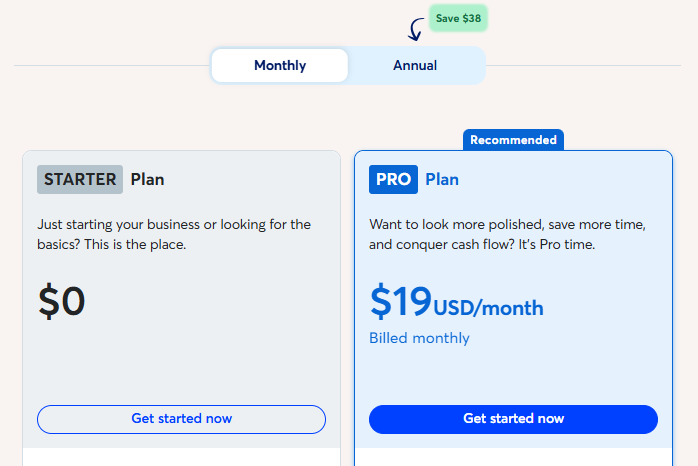
Wave’s Starter plan is free. The Pro plan costs $19/month and optional add-ons include receipt management ($8–$11/month), payroll processing ($25–$40/month), and Wave Advisors bookkeeping services ($149–$199/month).
The pricing structure is among the most accessible on this list, though costs can add up quickly if multiple add-ons are needed.
Pros
- The free Starter plan provides genuine accounting functionality, not just a trial, making it an excellent starting point for bootstrapped businesses with limited cash flow.
- The simplicity of the platform makes it accessible to users with no accounting background, with a minimal learning curve and straightforward interface.
Cons
- Wave’s scalability is limited; as businesses grow in complexity, transaction volume, or team size, most users find they quickly outgrow what Wave can comfortably handle.
- Feature development has slowed since the H&R Block acquisition, and the platform lags competitors in AI-powered automation and modern integrations.
Final Thoughts
The right accounting platform ultimately comes down to where your business is today and where you expect to be in two years.
- Puzzle stands out as a strong modern alternative to Digits if you’re an early-stage startup looking for automation-forward accounting with real accrual support and integrations with modern fintech tools
- QuickBooks will work well for online businesses that need the broadest accountant network, and proven scalability, despite its high cost
- Xero earns its place for international-facing businesses or owners who want a clean, user-friendly interface with unlimited users
- FreshBooks is the obvious pick if invoicing, time tracking, and client management are your primary workflows
- Wave remains the most accessible entry point for solopreneurs and micro-businesses that need functional accounting software without a monthly bill.
Whether you’ve outgrown Digits, need more niche features, want a free option to start, or simply prefer a platform with a deeper feature set and broader accountant ecosystem, all are alternatives worth seriously considering.