


Last Updated on October 29, 2026 by The Digital Merchant Team
Monetize the Gaps in your Calendar
When a client cancels, especially at the last minute, it leaves a costly gap in your spa schedule. A waitlist helps capture clients who might fill that opening so that you can recover otherwise-lost revenue. It might be a feature built into your existing software, or an add-on that might integrate with what you’re already using. Either way, you need to know how it helps your spa and your clients to make sure it’s worth the investment.
How Spa Waitlist Software Helped my Business Profit
As a licensed massage therapist, spa owner, and manager for more than three decades, I learned quickly that an empty appointment meant I was losing revenue. Admittedly, a full calendar can be a bit frustrating too, when your regulars can’t get in at their favorite date and time. Last-minute cancellations left us scrambling to fill openings, while clients looking for appointments days or weeks ahead found our schedule already full.
That’s what got me looking into a waitlist. Here’s how it’s helped us:
- Clients add themselves online. If they can’t find a time that works, they join the waitlist right from our booking page.
- They choose what they want. Clients pick the service, provider, dates, and times that suit them.
- We fill openings fast. We can see the whole list from our dashboard and reach out as soon as a spot opens, so time that would’ve sat empty gets booked.
- We recover revenue we used to lose. Demand we once had to turn away now turns into appointments.
- Clients are happier. They get in for a much-needed service instead of hearing “sorry, we’re full.”
- Staff are happier too. They’d much rather spend their shift caring for clients and earning a steadier living than waiting on a walk-in that isn’t coming.
What to Look for in a Spa Waitlist App
A good waitlist should make life easier for both your clients and your team. But the right one depends on how your spa runs. If you’re comparing options, here are a few things to think about before you choose.
Client Sign-up and Appointment Preferences
Check how easy it is for clients to join the waitlist and how much they can customize their request, like the service, provider, date, and time. Some platforms only let clients pick one of each, so look for one that lets them add a few options, like two different days or a couple of time slots.
Notifications and Automations
When a client cancels last minute, you need to see your waitlist fast. If it’s buried in a menu, you lose time trying to fill the spot. Look for a waitlist that shows up right on your dashboard.
It also helps to know who gets an alert when a spot opens. Does the software let you know? Does it let the client know? And what does that message look like on their end?
Then there’s the question of how much you want done for you. Some systems text waitlisted clients as soon as a spot opens so they can book it themselves. Others just show you the list, and your staff decides who to call.
Integration with Existing Booking Software
An independent waitlist software may be enough for you, depending on your current setup. But running it alongside a separate appointment calendar can introduce extra work and confusion to your staff and clients. Before choosing a waitlist app, confirm whether it can connect to the spa’s current booking software and what information moves between the two systems.
For example, some booking software has tools, like an API or webhooks, that let it connect to other apps. This can make it possible to link a waitlist app to your calendar, even if they don’t connect on their own. Before you sign up, check with both the waitlist app and your booking software to make sure they’ll work together. If they won’t, you’ll be running two separate systems, which is fine for some spas but means more work for your staff.
Waitlist Features at-a-glance
| Feature | Vagaro | Waitwhile | Boulevard | TablesReady | Mangomint |
|---|---|---|---|---|---|
| Online waitlist for clients (at no extra cost) | Yes | Yes | Yes | Yes | Yes |
| Automatic booking or manual | Both automatic & manual options. Client clicks link to book | Both automatic & manual options | Manual booking via staff | Both automatic & manual check-in options | Manual via staff. Staff send clients a link to book. |
| Client notifications | Yes: email, text, & push | Yes, via the app | Initial email notification of waitlist entry | Yes, via 2-way texting | Initial email notification of waitlist entry |
| Staff notifications | Yes: waitlist feature is on dashboard | Yes: in-app alerts | Yes: waitlist feature is on dashboard | Yes: in-app alerts | Yes: desktop & mobile app alerts |
| Multiple entries allowed | Yes: clients can add more than one date and time, and staff can add up to 5 | No | No | No | Yes, while client can only submit one date/entry, staff can enter several dates |
| Client’s ability to access waitlist feature | Access via client app, or site’s booking page | Via the app | Access via site’s booking page | Via text or in person kiosk for sign-in. Then 2-way texting | Via the online booking site |
| Monthly Investment | Starts at $23.99 | Starts at $0 | Starts at $143 | Starts at $0 | Starts at $130 |
Vagaro
Multiple Waitlist Entries, Notifications and Client Booking Option
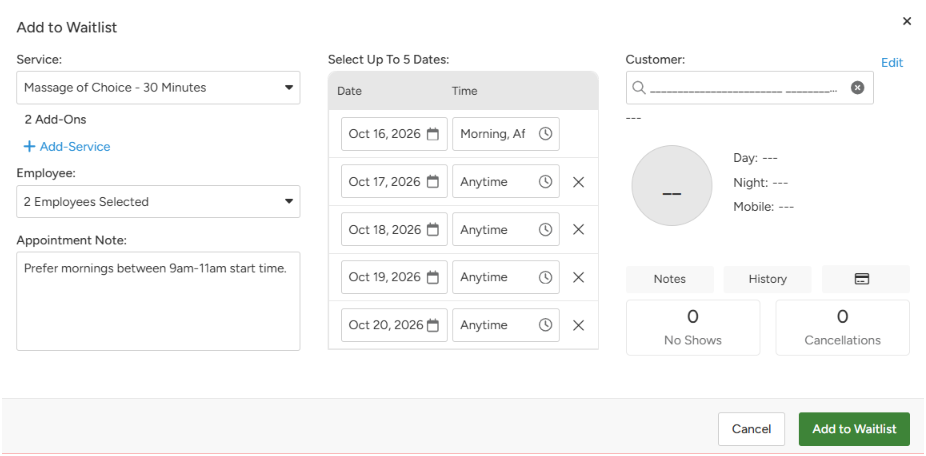
Vagaro offers a waitlist for clients on the website booking widget and dedicated client app, without an extra fee. Clients can add themselves to the waitlist inside the booking widget while choosing the service, provider, date and time ranges they’re interested in. Client notifications will go out via email, text and in-app when a suitable opening is available. From there, they can book it through your website or the client app.
On the staff side, adding someone to the waitlist is just as simple. Staff can click anywhere on the calendar to add a client, then choose the service(s), provider(s), up to five dates, and a time of day (morning, mid-day, evening, or all day). They can also leave a note for other staff to see. When an opening comes up, staff can click on a waitlisted client, check available times, and book them right there. Once booked, the entry automatically drops off the waitlist.
Vagaro starts at $23.99 a month for the first six months, and all of its waitlist features are included. After that, your price depends on which add-ons you choose.
Vagaro is best for spa owners who want multiple waitlist entry capabilities built inside their existing management software. They’ll also have a choice between staff-controlled scheduling and automated client notification and self-scheduling.
Waitwhile
A Flexible Queue and Appointment Tool, Focused on Multiple Industries
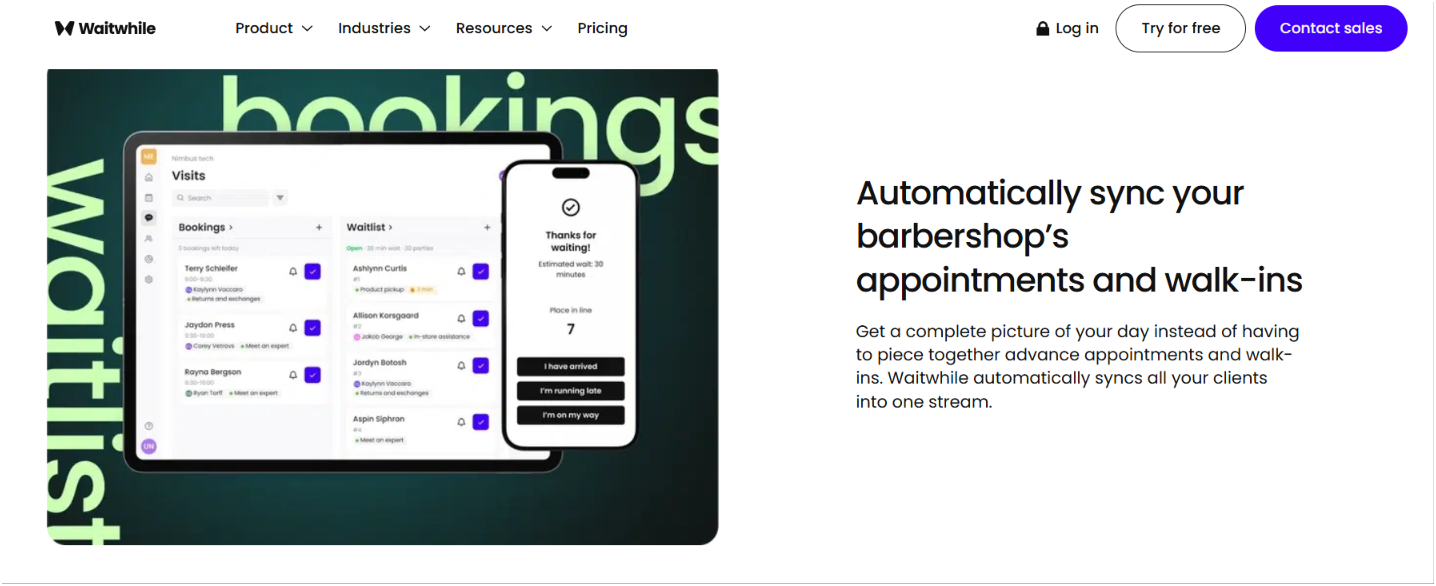
Waitwhile isn’t built specifically for spas, but it’s used by lots of appointment-based businesses, like barbershops and healthcare clinics. Since waitlists are its main focus, it could be a good fit if your current software doesn’t have one. Just make sure it can connect to the booking system you already use.
Clients will receive a public registration link to book ahead or join the waitlist queue for services on the Waitwhile app, or in person at your spa’s front desk kiosk. They will then be able to live-track their place in the queue while they wait for their session, or go run an errand or grab a coffee until they are told it’s their turn. Clients can receive notifications and messages in the app.
Staff can manage their calendars on any device inside the Waitwhile dashboard. There, they keep track of shifting appointments, walk-ins, and cancellations. You as the owner, can see everyone’s availability in one convenient place. You’ll see a snapshot of advance appointments and walk-ins in one streamlined calendar app, meaning it’ll merge all clients together in one central screen for user ease.
Waitwhile lets you connect this waitlist app with a CRM, POS, Calendar, Ticket Manager, Slack Channel, Website, App, and others.
Waitwhile is priced at $0/month for up to 50 client visits, and has business tiers above that going up to $79/month and more.
Waitwhile is best for spas who do not already have a waitlist feature in their existing software, and don’t need complex spa capabilities in their waitlist platform. Users will be able to configure digital queue and client registration processes.
Boulevard
Waitlist and Booking in One Place
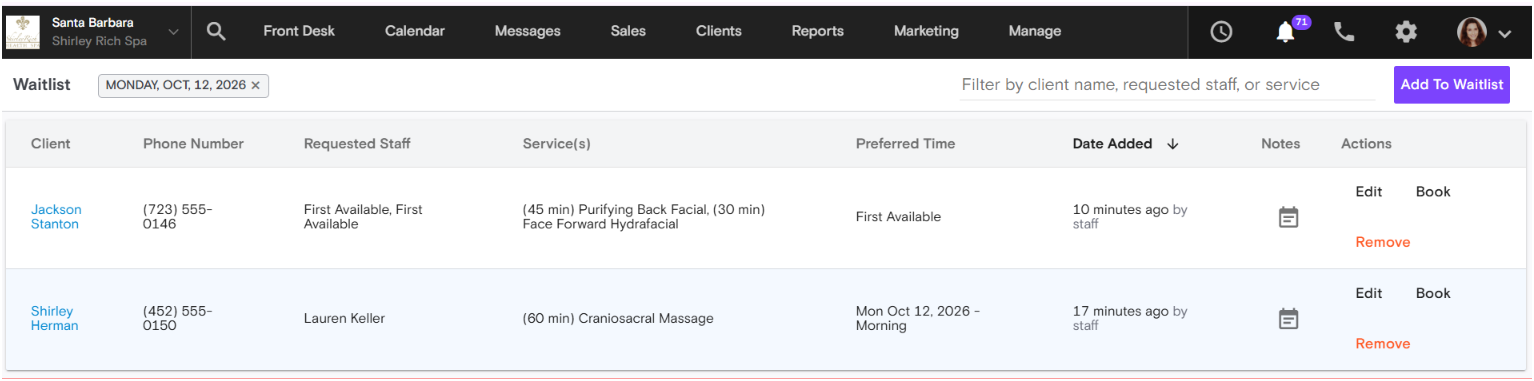
Boulevard includes a waitlist in its spa booking platform at no extra cost. Clients join from your booking page by picking the services, providers, date, and a time of day (morning, afternoon, or evening). Each entry covers one visit, and clients get an email confirming they’re on the list.
From there, your staff stays in control. They can see the full waitlist right on the dashboard and add clients themselves by clicking on the calendar. When a spot opens, staff reach out and book the client into it, so your team decides who gets each opening.
Boulevard is the most expensive option on this list, but it’s also the most robust. You’re not just paying for a waitlist. It’s a full spa management system with online booking, checkout, payments, client texting, and client profiles all in one place. It also handles memberships and packages, and schedules rooms and equipment along with staff, so the details spa treatments need are already built in. Pricing starts at $143/month and goes up to $328/month and beyond, depending on your plan.
Boulevard is best for spa owners looking to simplify how their spa runs. Instead of paying for separate booking, payment, and waitlist tools and trying to make them work together, everything lives in one place, with a waitlist built right in.
TablesReady
Text-Based Waitlist Management
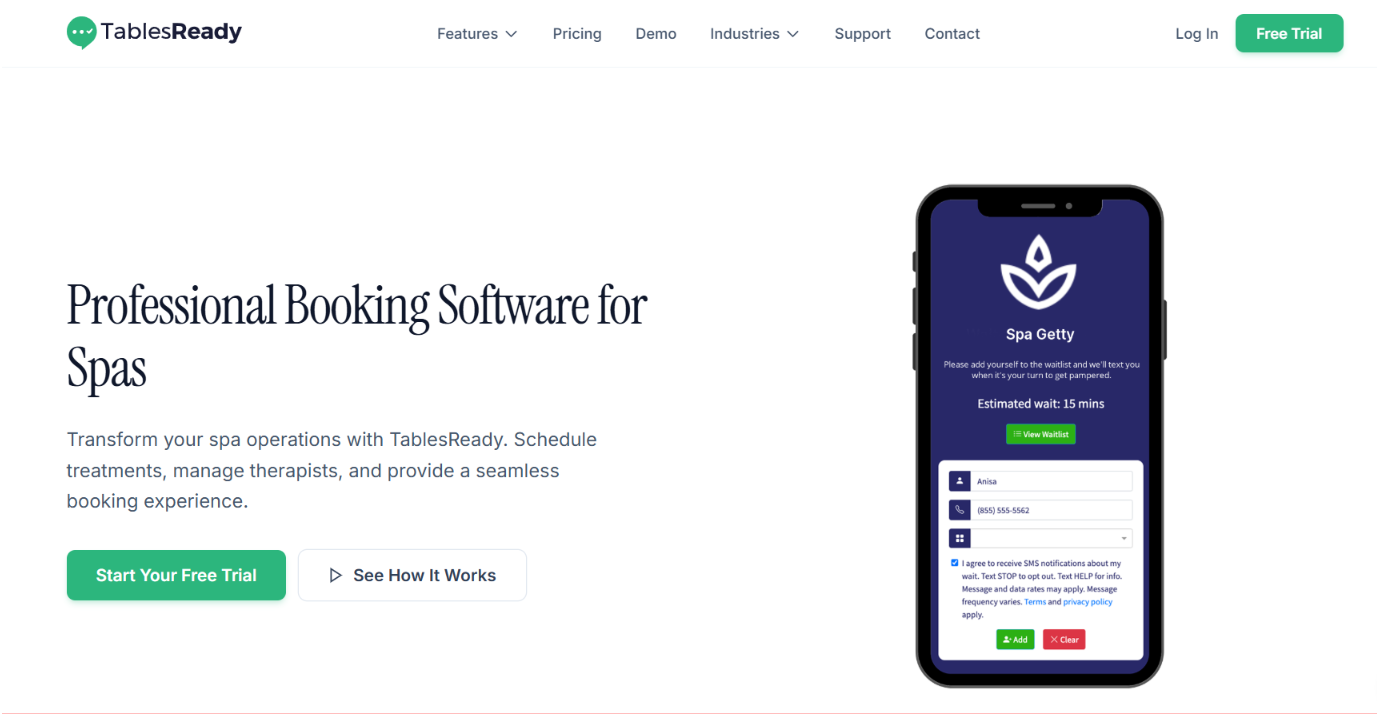
TablesReady focuses on digital waitlists using text notifications and encourages clients self-service. While this has more the look of a restaurant table-filler, it does have a 2-way text notification feature that may integrate with your current spa software. Clients don’t need to download an app or create an account, since it’s all done with their mobile phone number.
TablesReady lists integrations including Square POS, Reserve with Google, Stripe, and Zapier, depending on the parameters of your plan with them.
The biggest question is whether it works with the way your spa operates. While they serve a broad range of waiting and queue-management situations, they publicly seem to emphasize customer control. You’d want to verify that this system can handle the details spa treatments need, like room setup, treatment length, and which staff are trained to do each service.
TablesReady has a free plan with up to 150 messages a month, and every plan includes the waitlist. Paid plans start at $39 a month, and the $79 Business plan adds online booking and integrations with tools like Square and Google.
TablesReady is best for spa owners who prioritize a simplified client self-enrollment and text-based communication, especially helpful for a place with a good number of walk-ins.
Mangomint
Sends Staff Notifications to Proactively Reduce Empty Schedules
Mangomint is built for spas and lets clients join the waitlist while booking online. Like Boulevard and Vagaro, Mangomint does not charge extra for their waitlist feature. Clients will get an email confirmation of the waitlist entry they created, but no other notifications beyond that from the waitlist feature. It’s up to staff to contact the client and manually book them into an opening.
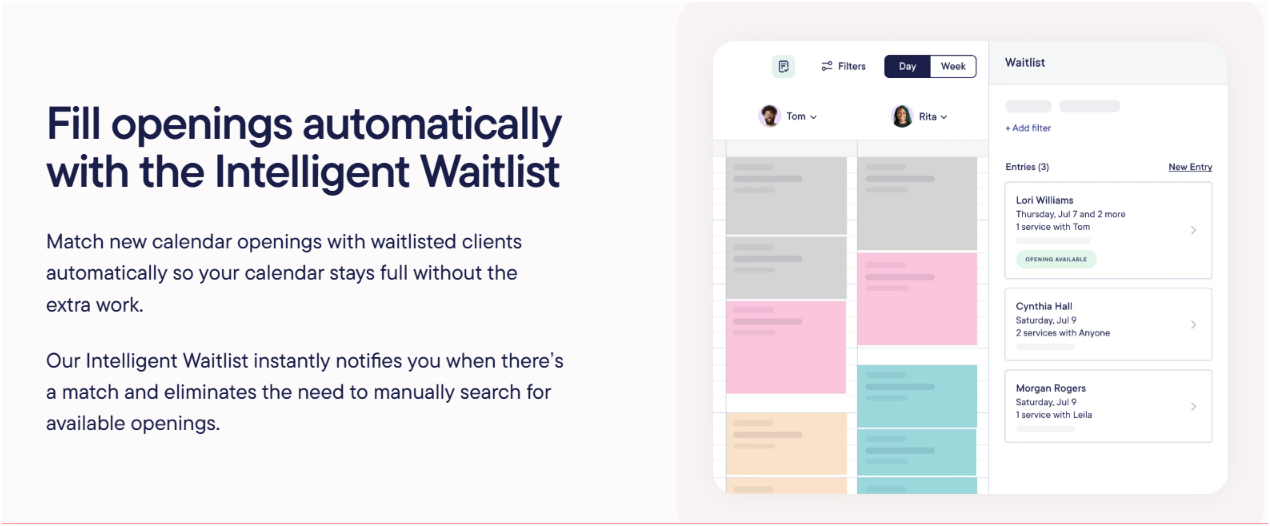
Staff can enter multiple dates and times for each client’s waitlist entry, as well as view the waitlist from the calendar or mobile app. They can filter entries by date, staff member, and location. Mangomint’s Intelligent Waitlist feature monitors the appointment calendar and notifies staff when a new opening may fit a client’s preferences. The staff notification feature is a key difference from its competitors.
Mangomint’s pricing starts at $120/month per location, plus $10/month per user with the waitlist feature built in.
Mangomint is best for spa owners who want a waitlist built-in, and also to have the software alert staff of waitlist entries that can fill their calendar.
How to Choose the Right Spa Waitlist Software
What does your waitlist need to handle? Think about whether it’s only a last minute appointment cancellation filler, requests for services by certain providers, multiple dates, or combinations of different services in one day.
Match the App’s Abilities to Your Workflow
Before adding a separate tool, check whether your current software already has a waitlist you can use. If you’re looking at apps like Waitwhile or TablesReady, which are built for walk-in queues and waiting rooms (not only spas), make sure they’ll connect with your booking system and make your day easier, not harder.
If letting clients pick several dates and times in one request is a must, look at Vagaro. But if you want one system to run your whole spa, Boulevard is the stronger pick. Your booking, payments, and waitlist all live in one place, and your staff decides who gets each opening.
Also ask how the waitlist connects to the spa’s existing workflow. Confirm whether client details, requested services, and opening notifications sync automatically. The less your staff has to do manually, the more efficient your busy days will be.
My Final Thoughts
After more than three decades in the spa industry, I know how frustrating it is to have holes in my schedule, last minute cancellations I can’t fill, and VIP regulars who are willing to fill the gaps but aren’t even aware they exist. The right waitlist app can make it easier to capture those client appointments, alert your team when availability changes, and keep regulars on track without adding hours of administrative work.