

- What Is Everflow? (And Who Is It For?)
- First Impressions & Ease of Use
- Best Everflow Features
- Partner & Affiliate Management
- Offer & Campaign Management
- Tracking & Attribution
- Analytics & Reporting
- Payments
- Integrations & Ecosystem
- How Everflow Compares for Affiliate Programs
- Everflow Pros and Cons
- Everflow Pricing & Support
- Everflow Review: Final Verdict
Last Updated on October 28, 2026 by The Digital Merchant Team
When you’re running an affiliate or partner program, spreadsheets and outdated dashboards can only take you so far. You need clear data, automation that saves time, and a way to see which partners are truly driving revenue.
In 2026, businesses want to get rid of this admin work that eats up valuable time.
That’s exactly what Everflow affiliate software promises, and after doing a bit of hands-on testing, I can see why so many brands are talking about Everflow.
Let’s go through the platform’s most important features step by step. I’ll share where it shines, where it could improve, and who it’s best for.

Everflow makes partner management simple, fast, and transparent. Real-time data, clean reporting, and tools built for affiliate managers who want to scale with confidence.
What Is Everflow? (And Who Is It For?)
Everflow is an all-in-one affiliate and partner marketing platform. It helps you track and manage everything from affiliate and influencer campaigns to agency media buys and B2B referral programs.
It isn’t a platform like Upfluence, which is mostly for finding and managing influencers. It’s more of an overall marketing dashboard for managing influencers and partners, with deep analytics and tracking to understand it all.
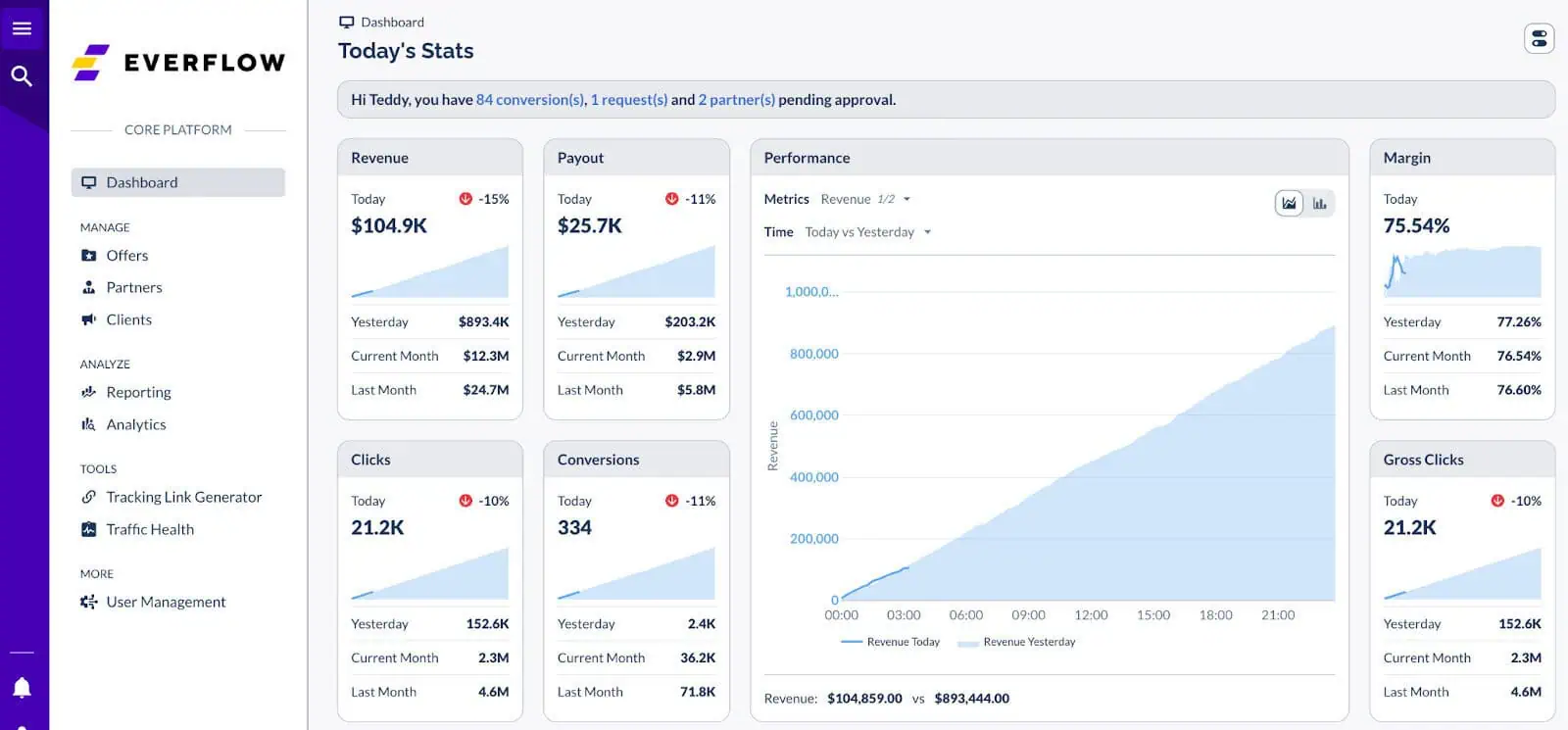
The Everflow Affiliate Software Dashboard
It’s designed for:
- E-commerce brands – track SKU-level performance, influencer campaigns, and coupon usage.
- SaaS companies – attribute signups, free trials, upgrades, and renewals.
- Agencies – manage multiple client programs in one dashboard.
- B2B and performance marketers – track referrals, partner deals, and CRM events.
It also has a “curated marketplace” to help brands find great affiliate partners and publications without searching through a huge list of profiles.
Everflow also lets you track Google and Facebook traffic, plus paid posts from outside the platform, so you can see more of your marketing results in one place.
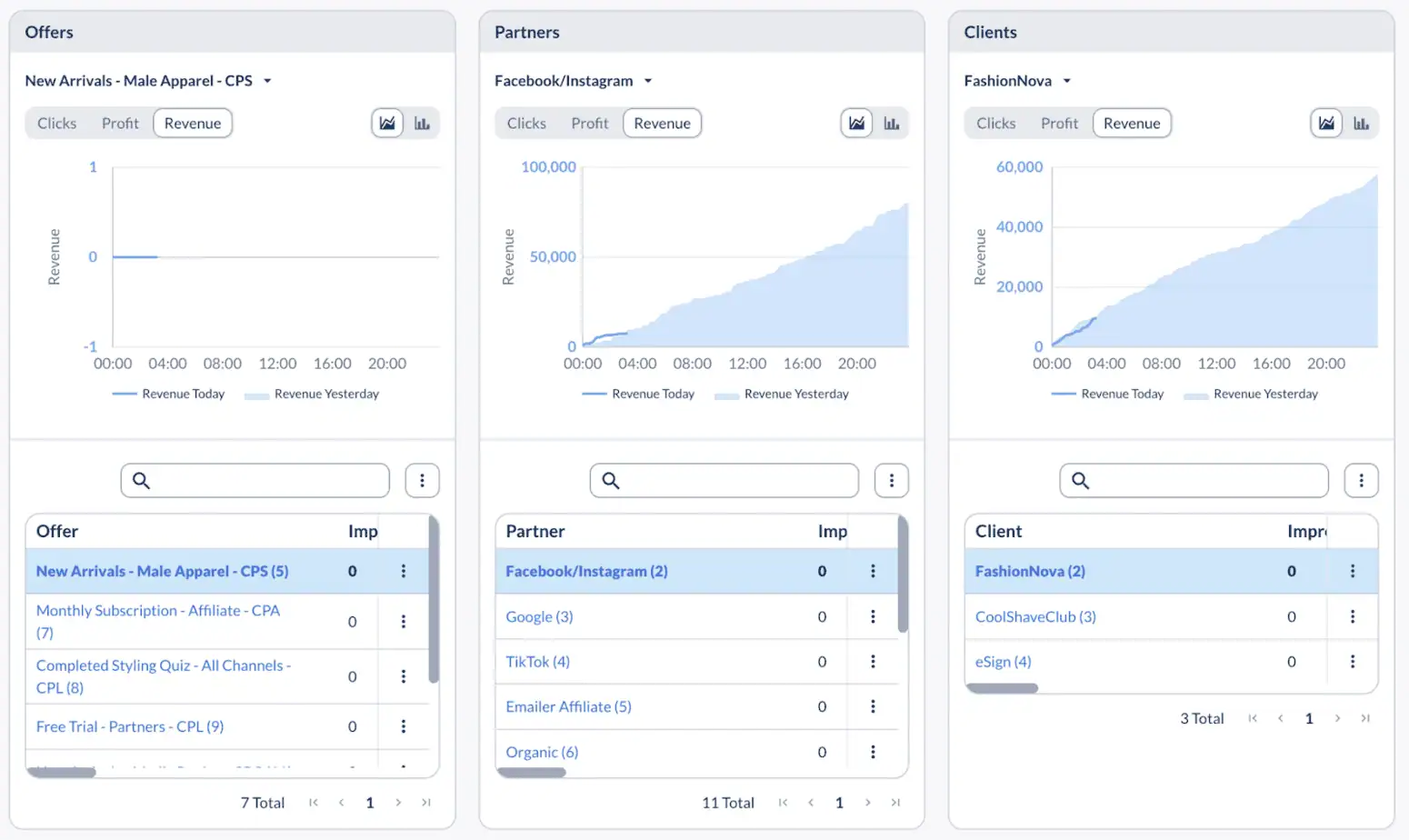
Dashboard showing traffic from outside Everflow’s marketplace.
In short, if you manage multiple partners, channels, or marketing sources and want one clear view of what’s working, Everflow is built for you.
First Impressions & Ease of Use
Everflow’s dashboard looks clean and is easy to find your way around. The basic tasks, like adding affiliates or setting up offers, are simple to start with. Setting up everything else, like custom tracking and connecting your other tools, will take more time.
Everflow has step-by-step guides that explain how to set things up. The guides also show a sample dashboard filled with example data, so you can see what yours will look like when it’s ready. I found this helpful because I knew what I was working toward before I started.
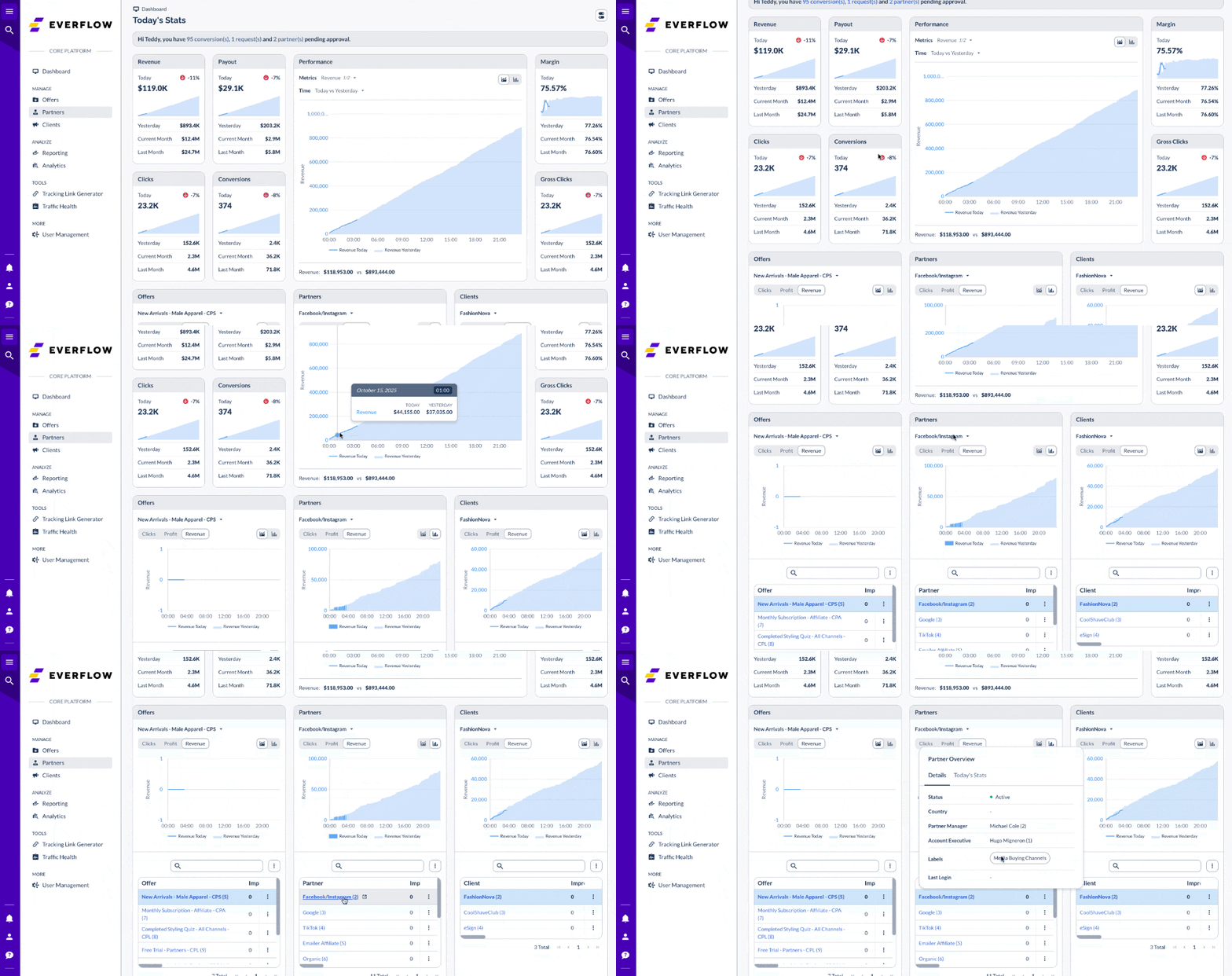
The dashboard shows all your channels together, including affiliates, influencers, media buys, and paid ads. This means you don’t have to jump between different sections to see how things are going. The numbers update quickly, and you can sort them by offer, partner, or region on the same page.
You can also use the dashboard to keep an eye on how your campaigns are doing and catch problems early, without having to dig through separate reports.
Best Everflow Features
Everflow has a lot of tools built in. These are, in my opinion, the best Everflow features and how they work.
Partner & Affiliate Management
Everflow brings all your partners together, including affiliates, influencers, agencies, and media buyers, into one easy-to-manage hub. You can approve or reject partners manually or using automations, group them by performance, and view every detail of their activity from a single profile.
If you already work with influencers, you can add them directly to Everflow, giving each one their own tracking links, coupon codes, or QR codes for campaigns. This makes it easy to track influencer-driven sales and pay them just like your affiliates, without needing a separate tool.
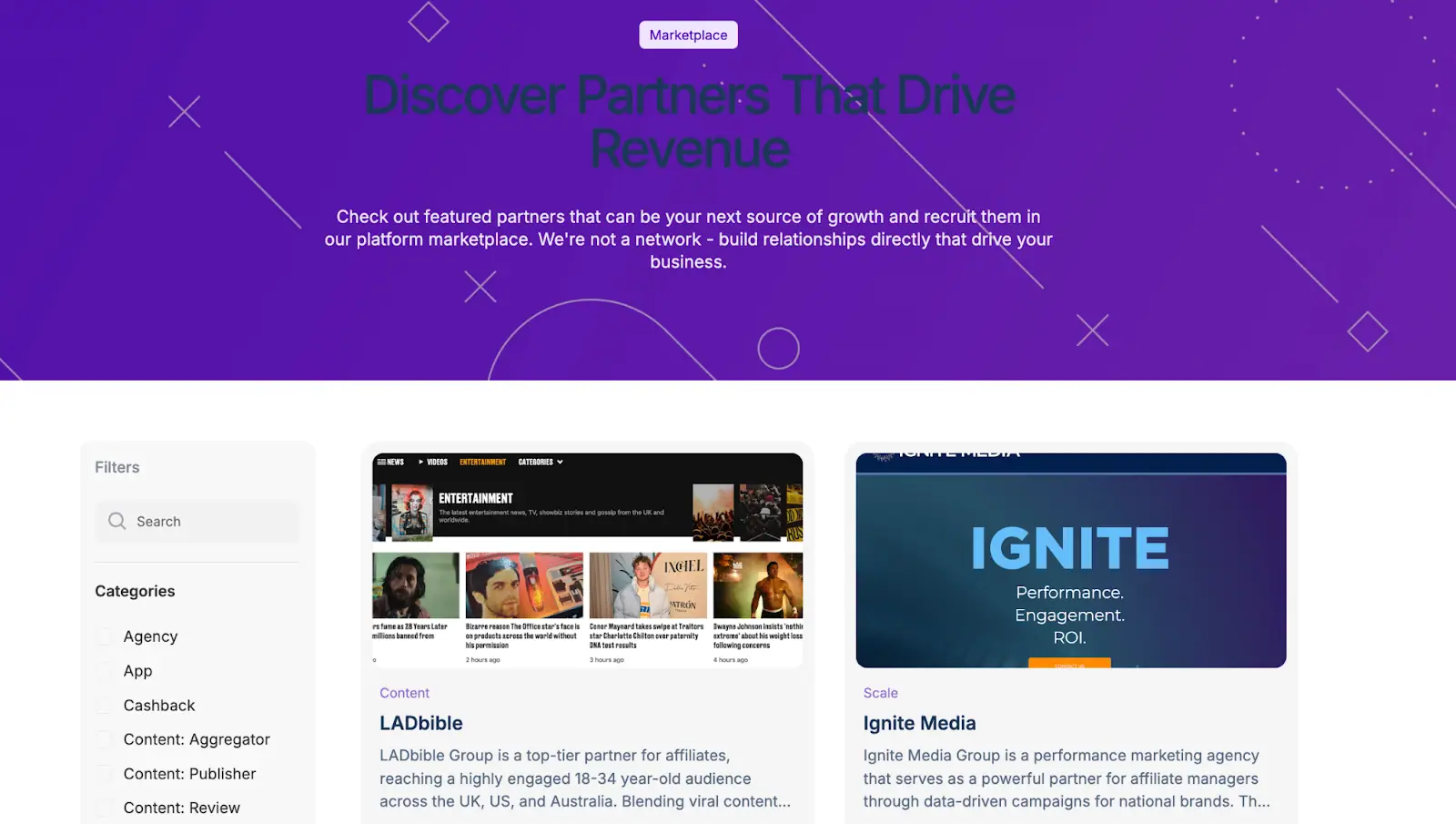
The Everflow Marketplace is designed to help you find partners such as publishers, ad networks, and media buying teams, rather than individual creators. There are great publishers on there that can help you create viral campaigns, such as LADbible, and niche-specific publishers like Moneywise.
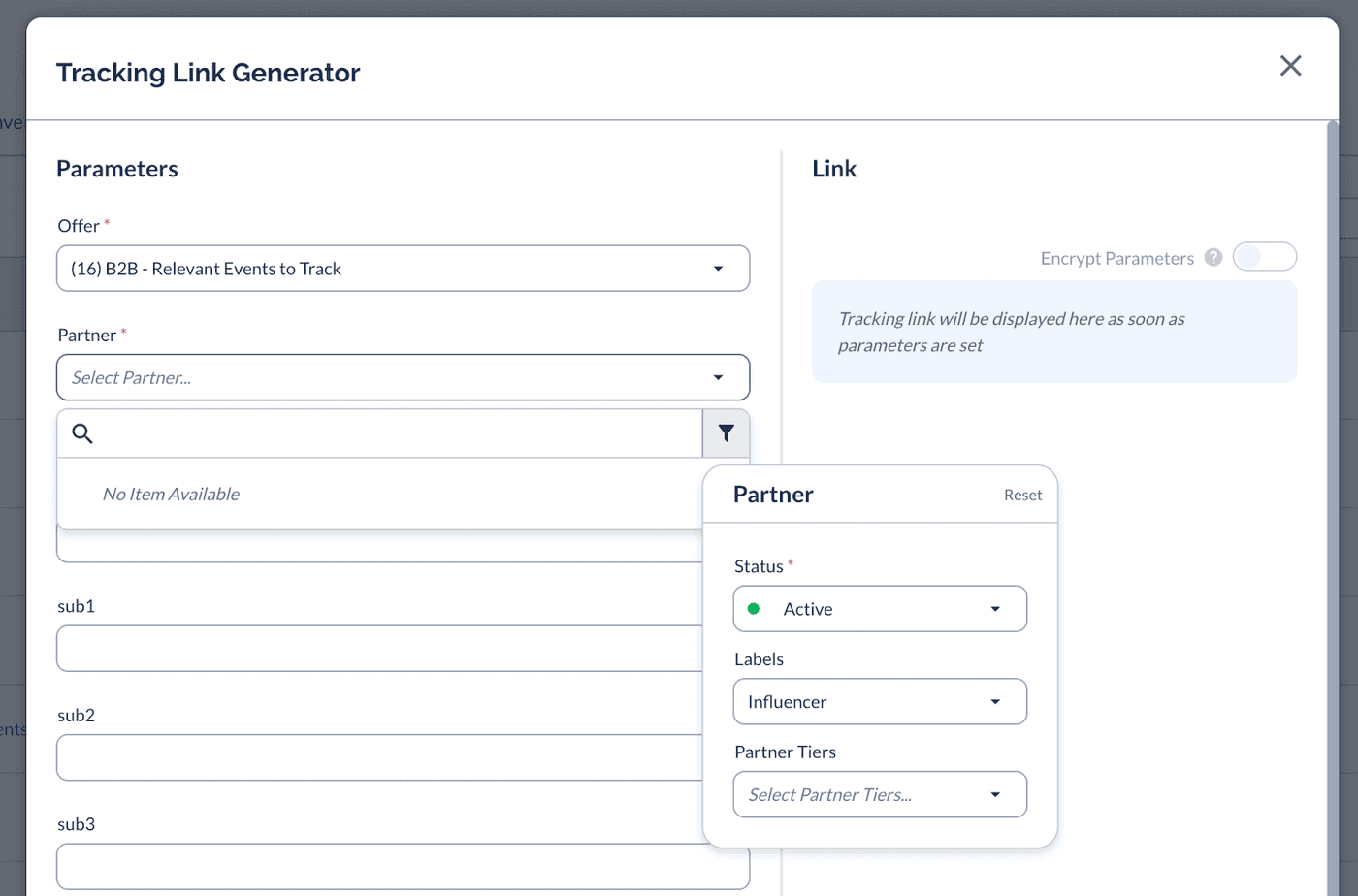
Adding influencers to your tracking is straightforward, and you can assign them different statuses and performance-based incentives using tiers. Each influencer will need their own tracking link, and the tracking link generator does just that.
Once they have been added, they can be tracked in the dashboard like any other partner, plus you can see their performance in detail through their own profile.
Offer & Campaign Management
In Everflow, offers are the campaigns or promotions you create for partners to promote—each with its own tracking links, payout rules, and conversion goals.
Setting up an offer is pretty easy, but there are a lot of details which can be confusing for very new users. You can create campaigns with custom payout types, like flat fees, revenue shares, or tiered commissions. Once that’s done, you can then attach creatives and assign partners. This makes it easy for the affiliates to promote your company in the best way, using your images and designs.
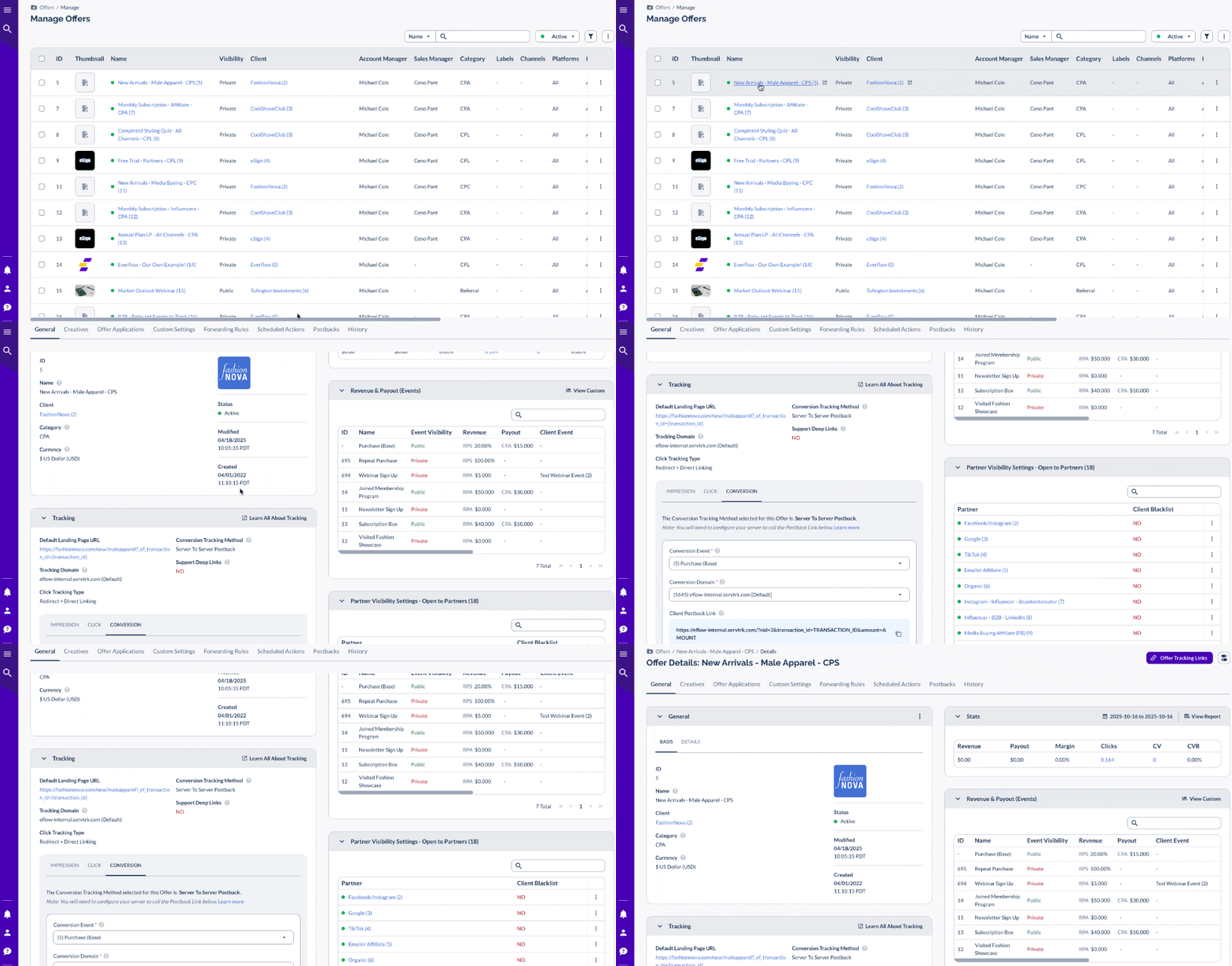
Everything is set up from one screen, and once an offer is live, you can track results in real time.
Everflow’s automation tools take a lot of the manual work out of managing campaigns.
- Smart Links automatically redirect each visitor to the most relevant offer, so you’re always maximizing conversions without lifting a finger.
- Fail Traffic ensures that invalid or mismatched clicks don’t go to waste—redirecting them to an eligible offer instead of dropping the user.
- SmartSwitch is Everflow’s optimization engine. It can automatically block placements or partners that underperform, detect potential fraud (like bot traffic or bad proxies), and shift more traffic toward sources delivering high-quality conversions.
- Other automations act like a digital assistant that handles routine tasks—automatically updating offers, sending alerts when metrics change, and syncing data with other tools through scheduled actions, notifications, and webhooks.
You can also create automated alerts and dynamic messages, so your team gets notified the moment something changes, like a sudden spike in invalid clicks or a dip in conversion rates.
Together, these tools make campaign management mean you spend less time watching your campaigns and more time trying to grow your business.
I’ve used a lot of affiliate tools, and Everflow’s automations are some of the most detailed I’ve seen. If you’re asking yourself, “Is Everflow worth it?” For teams that want to save time on manual tasks, the automations make a strong case.
Tracking & Attribution
Everflow’s tracking suite is detailed and covers a lot. It lets you track all performance channels, from Google and Facebook Ads to influencers, affiliates, and even offline campaigns (e.g., coupon or QR code tracking).
What You Can Track
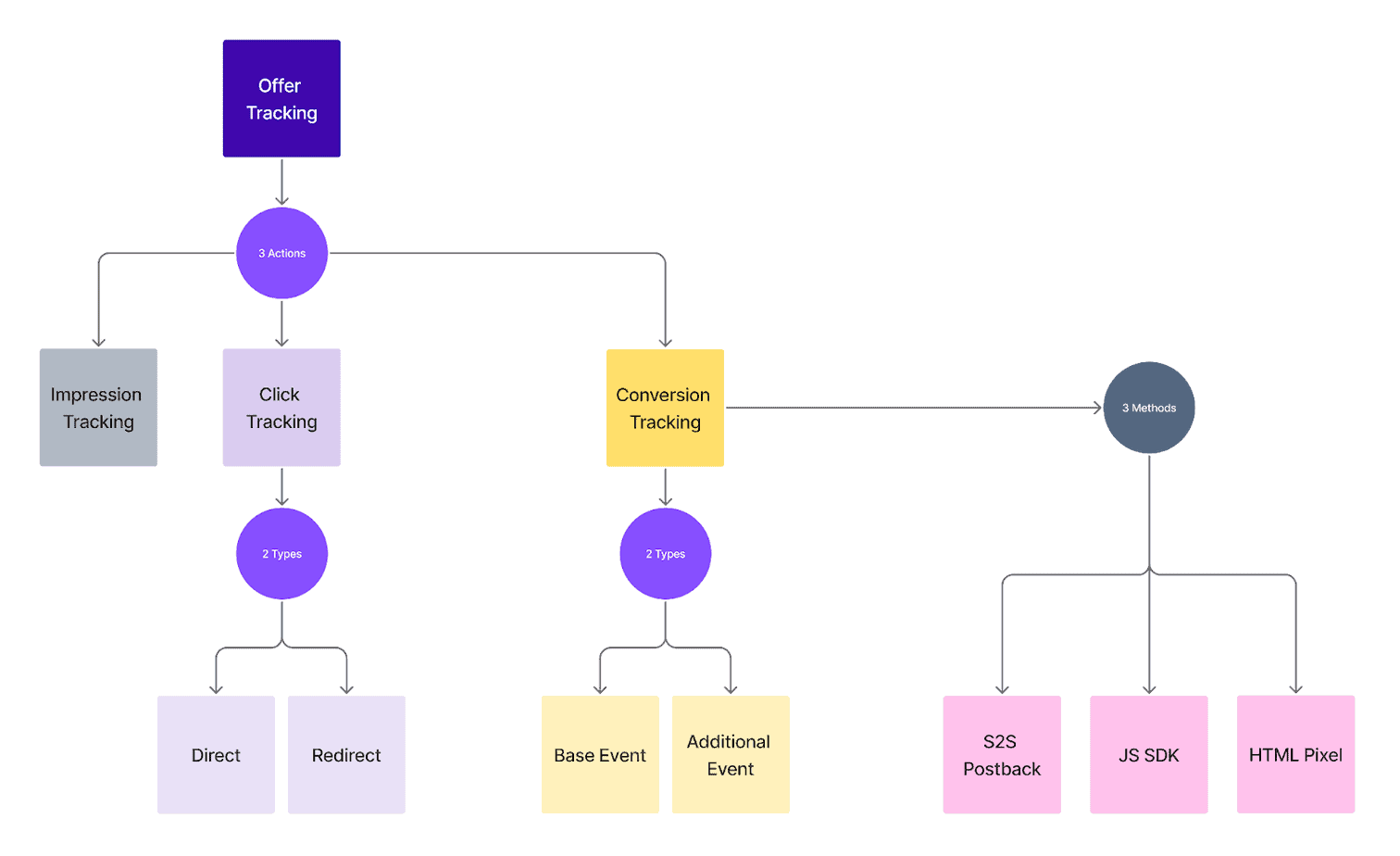
Everflow, like most tools, tracks three key types of actions (called “Events” in the system):
- Impressions
- Clicks
- Conversion Events – anything measurable after a click, such as purchases, form fills, or demo signups.
Source: https://helpdesk.everflow.io/customer/introduction-to-tracking-with-everflow
Tracking Links & Clicks
When you create an offer, Everflow generates Tracking Links. These are unique URLs that partners use to send traffic to your campaign. Each time a visitor clicks that link, a “click” event is recorded, along with all relevant data (source, device, region, sub-ID tags, etc.).
For this Everflow review, I created a tracking link below, so you can see how easy it is to create a basic tracking link, but there are lots of variables if you want to have more complex tracking.
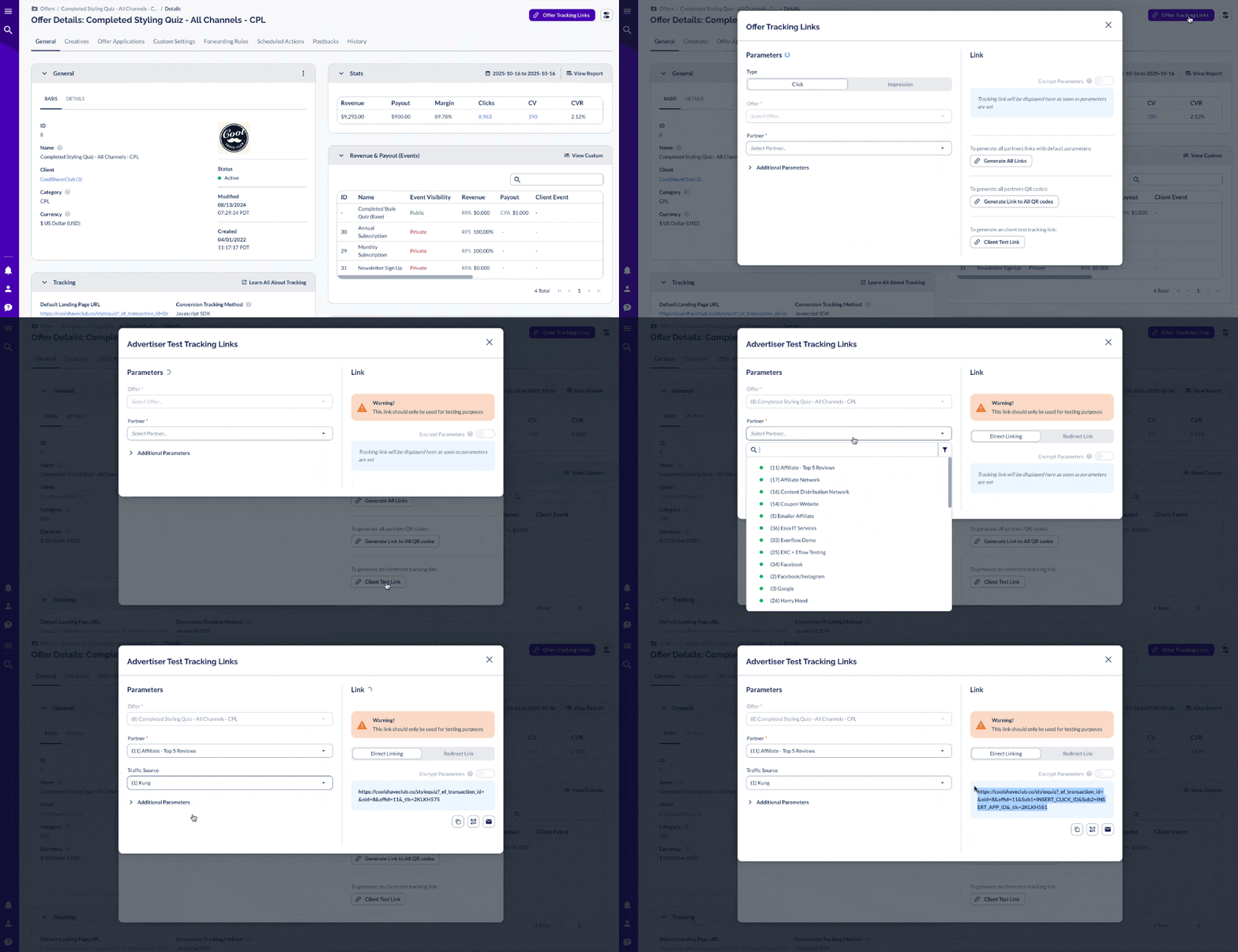
Everflow affiliate software supports two main types of click tracking:
- Redirect Linking: The most common and reliable method. Each click generates a unique transaction ID to ensure precise attribution. Redirect links have a tracking URL, which some partners don’t like using. But according to Everflow, these types of links are more robust as they don’t require any code being added to your site.
- Direct Linking: Ideal for media buys, social ads, or branded content campaigns where redirects aren’t allowed. Direct links go directly to your website, rather than via an Everflow URL. These require a bit more technical knowledge to set them up.
Conversion Event Tracking
Conversions are the reason you set up the tracking links, and can be used for any kind of conversion, such as a purchase, signup, or app install. Everflow records conversions automatically through your chosen tracking method, linking each conversion back to the original partner and click.
All the conversion events I created appear in the dashboard, so it is super easy to track everything. You can also set up custom conversion events for secondary actions like upsells, renewals, or webinar registrations.
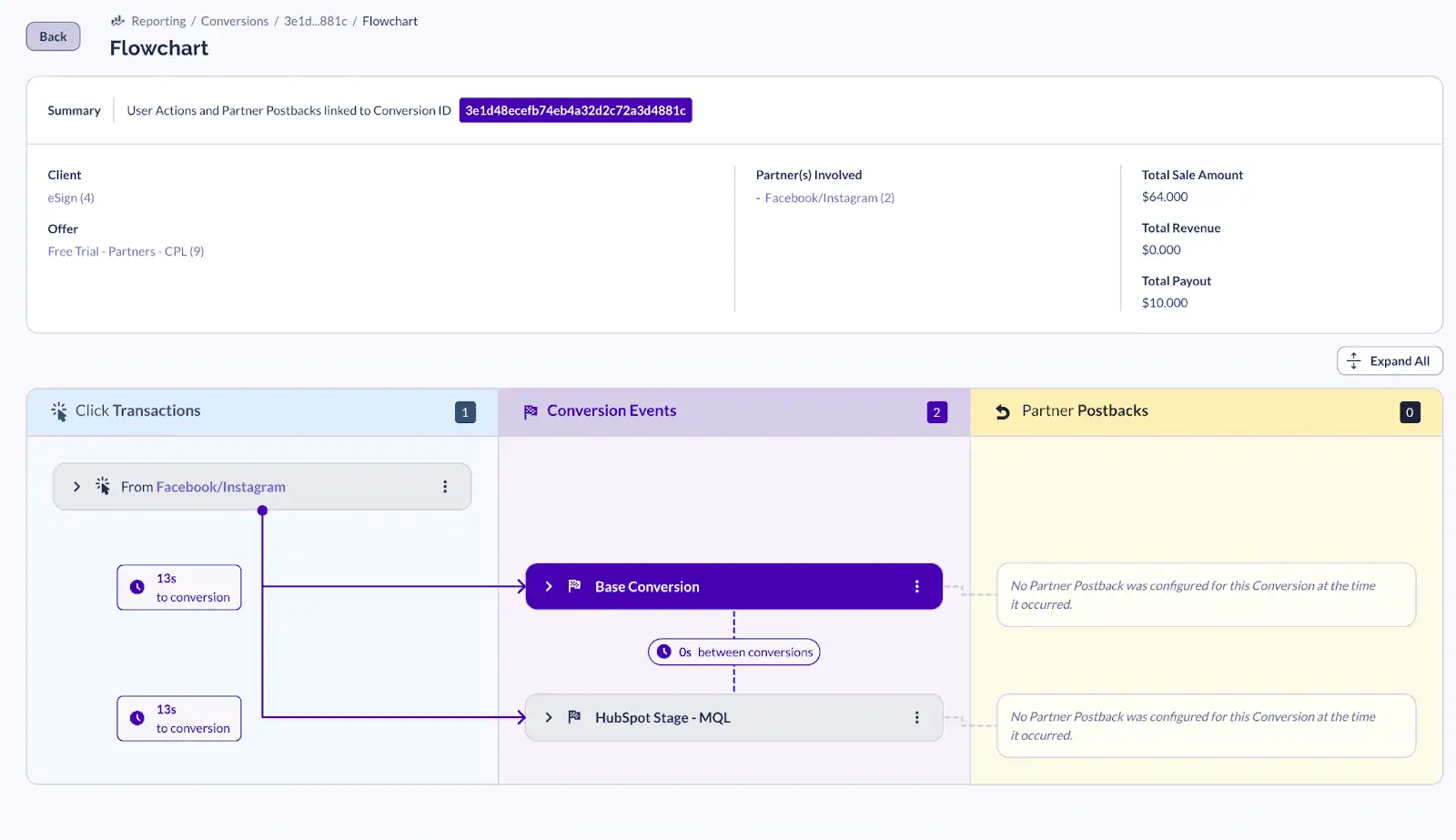
I really liked the flowchart report, which allows you to see where the conversion comes from and the entire customer journey.
Advanced Attribution Options
Beyond basic tracking, Everflow includes some advanced attribution models:
- Email Attribution: Matches leads or customers by email address, connecting offline or CRM activity back to the original partner.
- View-Through Attribution: Tracks conversions that come from ad impressions, not just clicks.
- First-Touch Attribution: Gives credit to the first partner who introduced a user, fixing the common “coupon site steals credit” issue.
Together, these features give you a full-funnel view of every partner’s contribution, not just the last click before a sale. Everflow doesn’t say which plans include these features, so ask on your demo call. They’ll mostly be used by larger programs or teams with more complex tracking needs.
Overall, my impression of the tracking in Everflow was that it is very impressive. The only downside would be it could be quite complicated for people who are very new to tracking affiliates and partners. Having said that, the basic options are very easy to understand, and it is great that the tool can grow with you as your tracking needs increase.
Analytics & Reporting
Everflow’s analytics tools are built for data-hungry marketers. You can run:
- Dimensional Reports – view up to five data points at once.
- Flex Reports – pivot table-style reports for slicing and grouping data.
- Placement Reports – analyze traffic quality and catch low-value placements.
You can also run reports on all the different filter options, such as offer, account manager, partner, etc. There are too many options to add here, but you can see them in this link.
This means you can run reports on how a particular brand is doing, or whether an offer is converting, or even how a particular account manager is performing, as I show below.
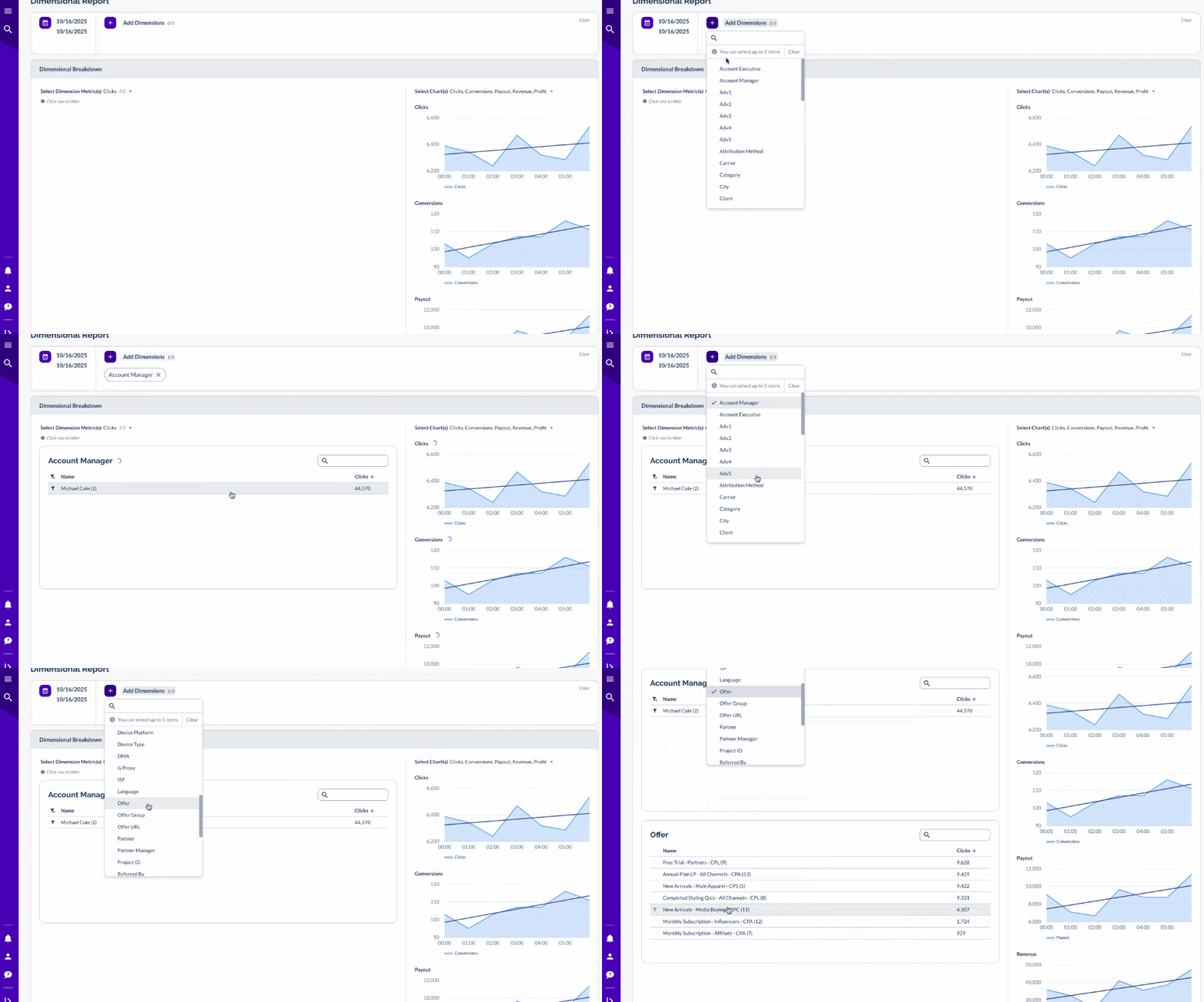
This level of detail is perfect for tracking multiple offers, partners, and campaigns. Plus, you can see all the high-level details in the dashboard.
Payments
Everflow has its own payment system, called Everflow Pay. It allows you to automate partner payments, invoices, and tax document collection. There’s also Managed Payments, where Everflow handles everything for you for an extra fee.
Setup is quick: partners enter their banking and tax information once, and from there, you can review, approve, and process payments automatically or on schedule.
Integrations & Ecosystem
Everflow integrates with all major platforms, including:
- Shopify, WooCommerce, BigCommerce
- HubSpot, Salesforce, Stripe
- Google Ads, Meta (Facebook), TikTok
The main benefit of the integrations is you can see all your data in one place, to help you make good marketing decisions. You can see all your integrations on the dashboard.
Performance
Everflow runs really fast. While I was testing for this Everflow review I didn’t experience any delays at all, and the data is populated from page to page straight away. Reports load instantly, dashboards update in real time, and integrations don’t lag.
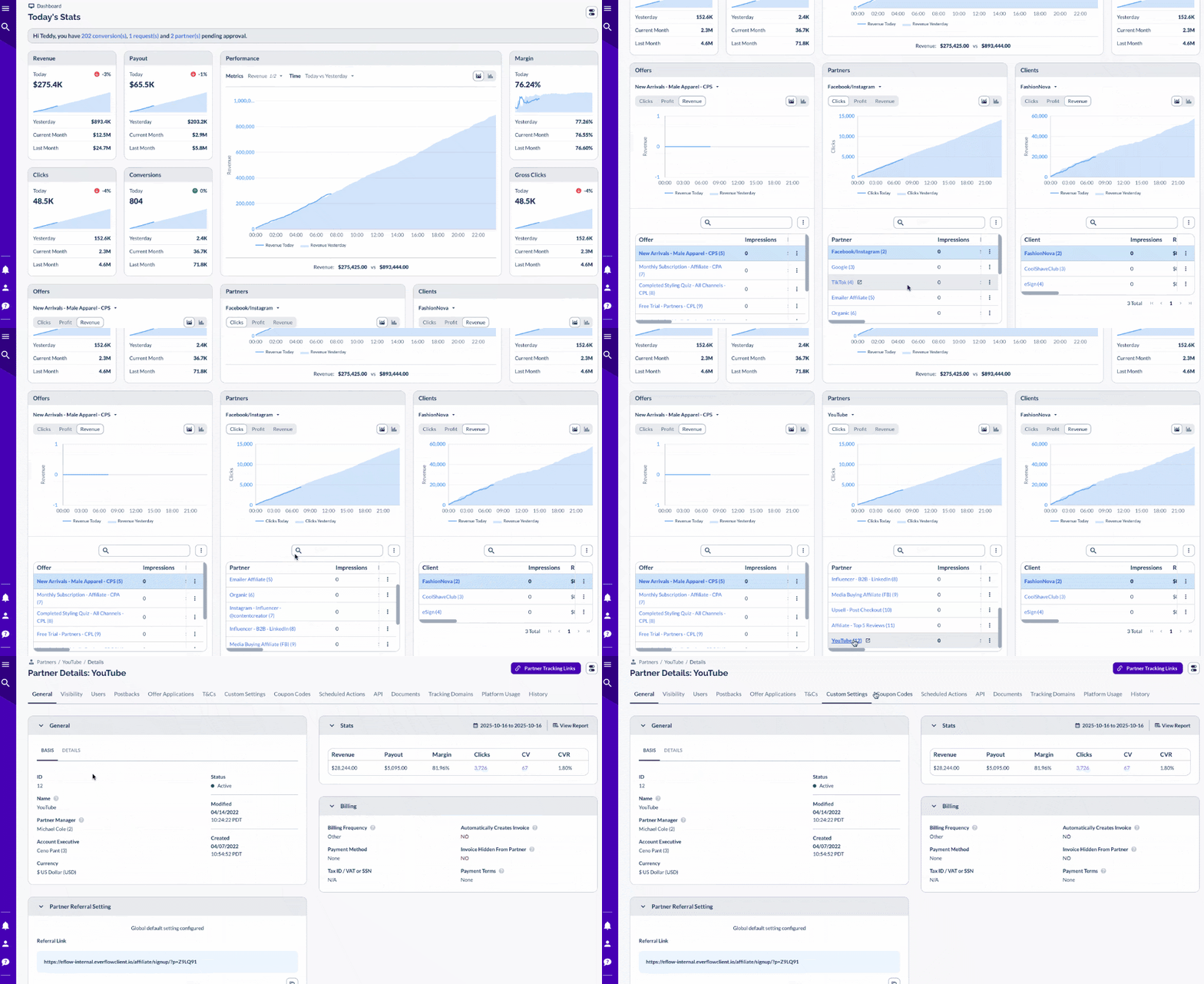
I really like how the data in the dashboard is presented; it makes it easy and fast to move from the dashboard to click further into an item for more information. For example, in the dashboard below, I am looking at partners and the number of impressions. If I want to click in to see why YouTube doesn’t have any impressions, I can click in and go into a bit more detail.
How Everflow Compares for Affiliate Programs
PartnerStack, Upfluence, Impact, and Tapfiliate all handle partnerships in their own ways. Here’s how Everflow stacks up against each one.
Everflow vs PartnerStack
PartnerStack was built for SaaS referral and reseller programs, not traditional affiliates. It’s great at automating partner onboarding and payouts, but it’s limited in tracking flexibility. It’s a strong fit for B2B SaaS companies that mainly want to grow through referral partners and resellers.
Everflow, on the other hand, lets you manage affiliates, influencers, and even media buyers side by side. You can customize attribution models (first-touch, multi-touch, view-through), create unique offers, and run campaigns outside SaaS referrals.
Everflow vs Upfluence
Upfluence is an excellent influencer discovery and outreach tool. Its tracking is focused on influencer campaigns, so it’s less suited to managing other channels in one dashboard. It’s a better fit for brands whose main goal is finding and reaching out to influencers.
Everflow doesn’t help you find influencers, but once you’ve recruited them, it can track and pay them alongside your other partners. Each influencer gets a unique link or coupon code, and you can view performance data right alongside your affiliate and media campaigns.
Everflow vs Impact
Impact is one of the biggest names in partner management. It handles affiliates, influencers, and other partner types in one place, and its entry-level plan keeps it within reach for smaller brands. The tradeoff is the learning curve. There’s a lot in the platform, and getting comfortable with the advanced features can take time.
Everflow is also a big platform, and like Impact, can take time to learn. How hard the setup is depends on how many tools you’re connecting and whether you’re building custom tracking. Once it’s running, you get advanced automation and real-time analytics, which work well for teams that want close control over their data.
Everflow vs Tapfiliate
Tapfiliate is a simple, affordable option built for affiliate programs. It’s quick to set up and works with platforms like Shopify, WooCommerce, and Stripe. It also includes recurring commissions, white-label dashboards, and multilingual support. It works best for growing e-commerce and SaaS businesses that want a straightforward affiliate program with fixed monthly pricing that’s easy to budget for.
Everflow goes beyond affiliates, with multi-touch attribution and fraud detection built in. It works well for businesses that are already running several channels or plan to scale soon. For a deeper look, check out our full Tapfiliate vs Everflow comparison.
Everflow Pros and Cons
Pros
- Fantastic unified dashboard for affiliates, influencers, and agencies
- Granular multi-touch attribution (click, view, email, first-touch)
- Automation that reduces manual work
- Built-in payments and fraud protection
- Fast, reliable analytics with flexible reporting
Cons
- Everflow Pricing not publicly listed
- Advanced features require some knowledge and setup (though the basic functions are easy to use)
- May be overkill for small businesses
- Requires a six-month minimum commitment, as results can take that long to show
Everflow Pricing & Support
Everflow offers tiered pricing based on usage, and an optional premium service, Everflow Plus, which includes a dedicated account manager, quarterly reviews, and affiliate readiness training. While their pricing isn’t public, it is tiered, so it grows with you as your payouts grow too. That being said, Everflow requires a six-month minimum commitment, so you’ll be locked in for at least that long once you sign up. Everflow says this gives them enough time to help your program grow and show results.
The customer documentation is some of the best I have seen. The search function for different features is easy to use and picks up what you are looking for, even with typos or misunderstandings. I have linked to some of the help articles in this review, so you can check it out for yourself.
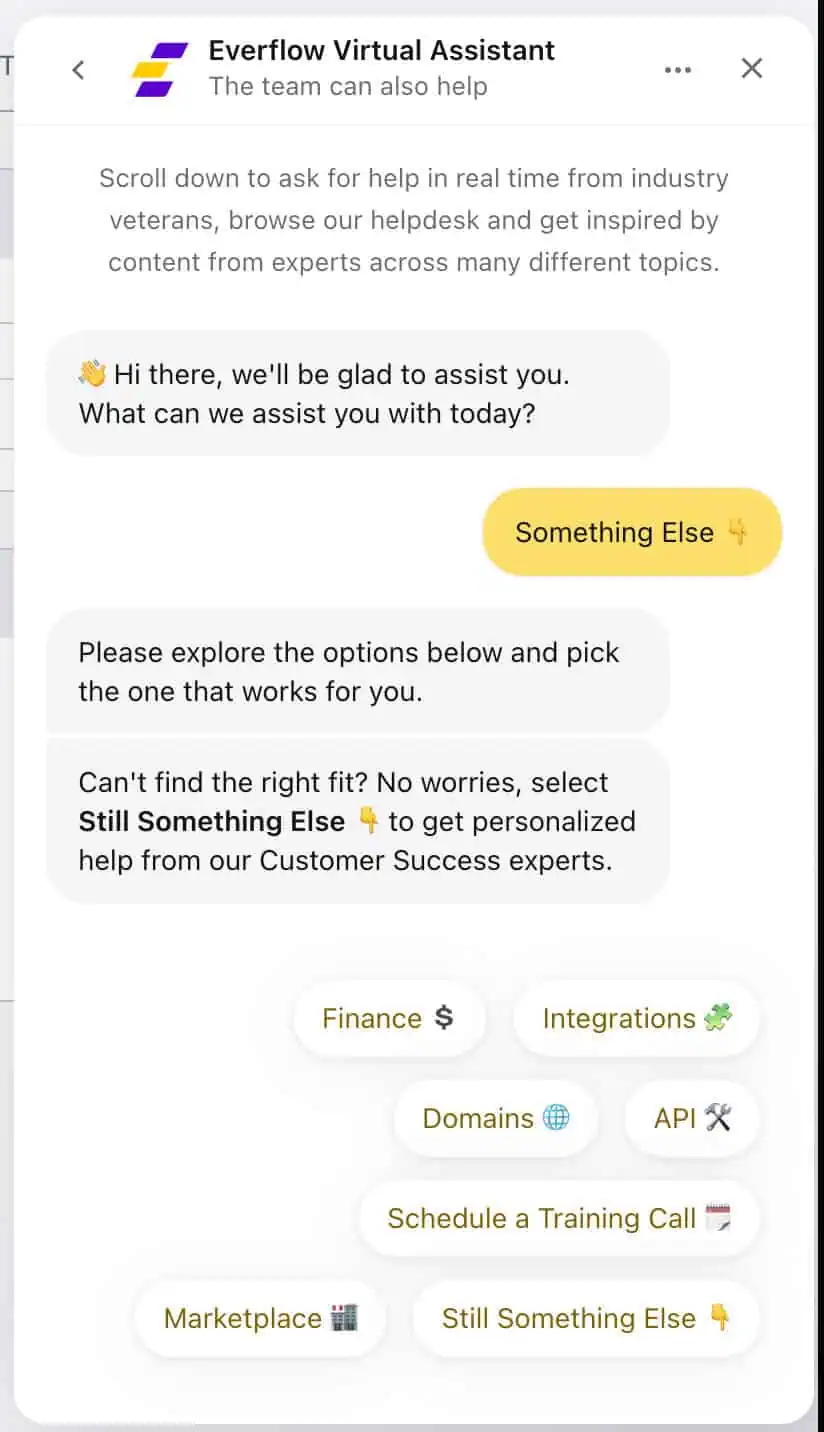
They also have an AI assistant, which answered nearly all my questions. Plus it was easy to get through to an actual agent, if you need to talk to a real person!
Everflow Review: Final Verdict
After testing Everflow, I’d call it one of the most complete partner marketing platforms out there. It’s flexible enough for e-commerce and SaaS, and it can handle the needs of agencies and enterprise teams.
If you want to see which partners bring in the most sales, and you want tools that save you time, Everflow is worth a look. Just keep in mind it takes time to learn and needs a six-month commitment, which may not suit smaller brands that are still testing out affiliate marketing.
In short: Everflow isn’t just for affiliates. It’s the command center for every type of partnership you manage in 2026.
Everflow makes partner management simple, fast, and transparent. Real-time data, clean reporting, and tools built for affiliate managers who want to scale with confidence.