


- What is Metro by T-Mobile?
- How Metro by T-Mobile Compares to Competitors
- How I Tested Metro by T-Mobile
- Metro by T-Mobile Coverage
- Metro by T-Mobile Speeds
- Metro by T-Mobile Pricing
- Metro by T-Mobile Benefits and Offers
- Metro by T-Mobile Hotspot Essentials
- Metro by T-Mobile Device Financing Options
- Metro by T-Mobile: Final Verdict
Last Updated on May 29, 2026 by Ewen Finser
As a journalist and digital nomad, I depend on having constant access to a reliable, affordable wireless connection for everything from submitting articles to connecting to VPNs.
That means that choosing the right prepaid carrier isn’t just a cost-cutting exercise for people in my situation; it’s a professional decision. Even if you don’t regularly use mobile Internet for work, there are a lot of Mobile Virtual Network Operator (MVNO) options on the market right now.
As I bounced between plans like these, which piggyback on major carriers’ infrastructure, Metro by T-Mobile kept coming up in conversations around value and network reliability.
Rather than take anyone else’s word for it, I decided to install a Metro SIM in my cell phone and share what I found after putting the carrier through its paces.
What is Metro by T-Mobile?
Metro originally started its life as ‘MetroPCS’, but was rebranded in 2018. It’s a prepaid service that’s directly owned by T-Mobile US.
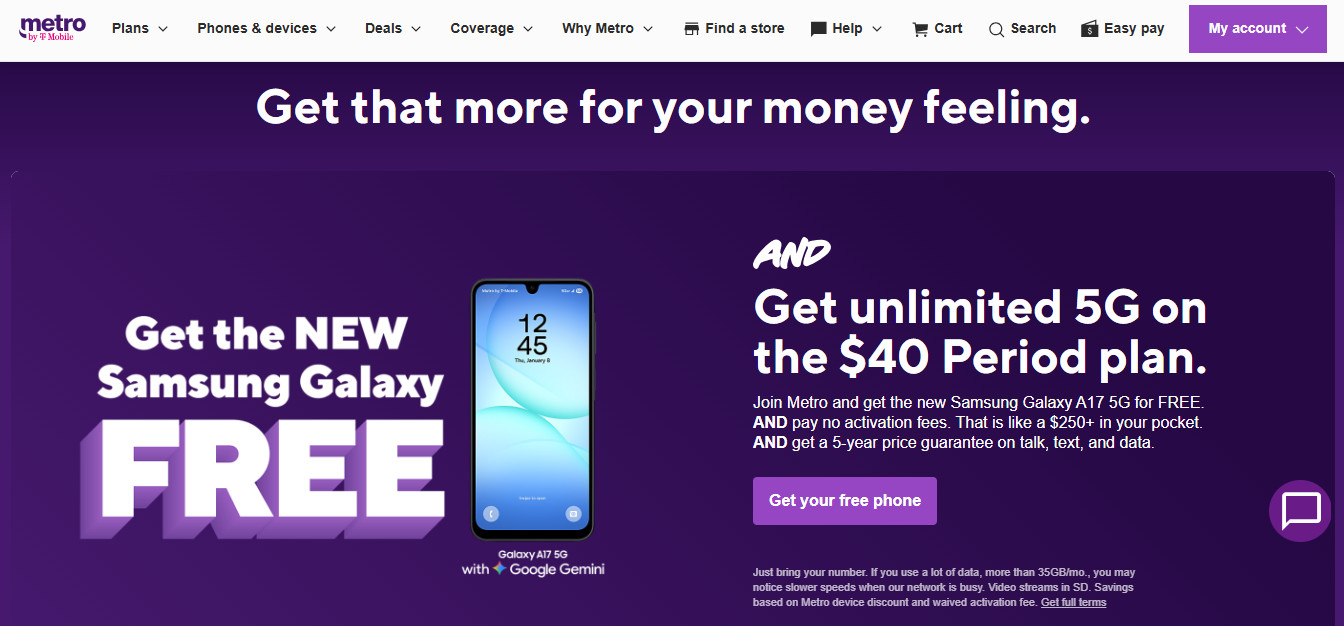
That means it’s different from MVNOs that buy wholesale access to telecoms networks it doesn’t control. Metro runs on the same infrastructure as T-Mobile’s paid customers, with one key difference: In times of network congestion, Metro customers’ traffic can be deprioritized behind T-Mobile postpaid subscribers in some cases. That’s an important distinction, and we’ll explore it more in the following sections.
Currently, Metro’s available in the USA, though there are also add-ons to extend coverage to Canada and Mexico.
As a prepaid offering, there’s no ongoing contract. Fees and taxes are also typically included in the monthly price.
How Metro by T-Mobile Compares to Competitors
Carrier | Typical Pricing (single line) | Hotspot Details | Winner? |
Unlimited from $25/mo; higher tiers around $50–60/mo. | $50/$60 tiers include 40GB/50GB hotspot; cheaper tiers may need add-ons. | Metro for perks and upgrade benefits; Boost for heavier hotspot use. | |
Unlimited roughly $45 – 60/mo, with taxes/fees included on many advertised plans. | Hotspot included on higher unlimited tiers, commonly 15 – 50GB; add-on on some lower tiers. | Metro for T-Mobile 5G speed/perks; Cricket where AT&T coverage is better. | |
Base around $25/mo; higher tiers vary by promo/plan, taxes included. | Unlimited hotspot, speed-capped: usually 5/10/15Mbps depending on tier. | Visible for cheap Verizon unlimited and hotspot; Metro for speeds and urban T-Mobile 5G. | |
Prepaid in multi-month blocks; intro promos can be very cheap, but renewal pricing matters. | Hotspot included on all plans, capped by plan/data allowance. | Mint for lowest upfront annualized cost; Metro for monthly flexibility and extras. | |
Unlimited commonly around $45 – 65/mo; taxes/fees apply. | 10GB/30GB/unlimited capped-speed hotspot depending on plan/network. | Metro for cleaner perks/upgrades; Straight Talk for higher overall hotspot allowance. |
Pros
- Competitive prepaid pricing with taxes and fees typically included
- Access to T-Mobile’s extensive 5G network
- 5-year price guarantee on eligible plans
- Solid included perks on higher tiers (Google One, Amazon Prime, T-Mobile Tuesdays)
- Easy bring-your-own-device setup with no annual contract
Cons
- Hotspot data allowances are fairly limited compared to some competitors
- International roaming support is minimal outside Canada and Mexico
- Some plans may see slower speeds during network congestion due to deprioritization
- Video streaming quality is capped on lower-tier plans
- Best pricing often requires online signup or multi-month prepayment
How I Tested Metro by T-Mobile
During my time in the Lilac City (Spokane, WA), I installed a Metro SIM card into my existing unlocked handset.
My use case is fairly representative of what a working, traveling professional is likely to need on a daily basis, including:
- Streaming HD quality video
- Heavy web browsing and research
- Downloading large files to install/update operating system
As a nomad, I also made regular use of my device as a mobile hotspot for my laptop. Metro allows you to bring your own phone cost-free, though there are options for device financing, which we’ll explore later.
Metro by T-Mobile Coverage
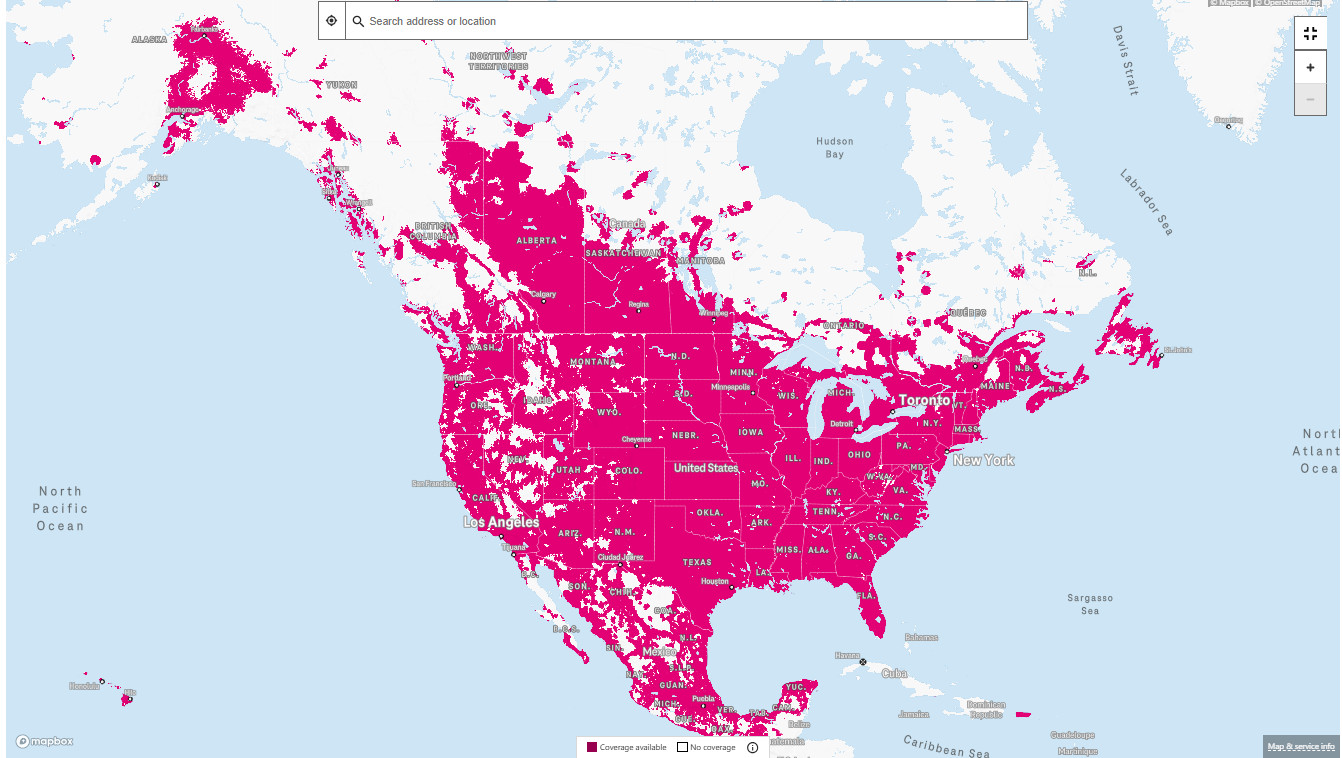
As we’ve learned, Metro runs on T-Mobile’s network. That means coverage extends to 99% of Americans on 4G LTE, and T-Mobile claims that its 5G footprint is the largest of any US-based carrier. For most urban users, that means you’re likely to get some of the best mobile data speeds available in the USA, allowing for network congestion.
For example, in Spokane, where I tested, 5G coverage now extends across almost the entire city. I experienced solid streaming and download speeds throughout downtown and around Spokane Valley.
Things become a little murkier if you want international reach, though. For example, Metro offers an ‘unlimited’ plan for $5/month for unlimited calls and texts to Mexico and Canada, with 5 GB of data roaming.
The main website lists other countries where roaming is supported for calling, and there’s a ‘Global Voice’ add-on for certain base rate plans (starting at $10/month) for 210+ countries and destinations, including unlimited texts. However, this isn’t the same as having broad international roaming with unlimited data abroad.
If you only travel within the USA, this is unlikely to be a major concern in cities and suburbs. But if you need reliable coverage and generous data in other countries, then Metro probably shouldn’t be the only plan you rely on.
Metro by T-Mobile Speeds
If you got to Metro’s main website, you’ll see a colorful advert clearly stating:
- One line
- Unlimited 5G
- $20
In practice, though, you need to examine this carefully before signing up, as there are some caveats.
The promise of unlimited premium data with no firm monthly premium-data cap only applies to the most expensive (and appropriately named!) ‘Unlimited Premium 5G data’ plan for $60/month.
Previously, this was capped at 70 GB per month, at which point Metro users faced the possibility that during periods of peak network congestion, their traffic would get moved to the back of the line behind T-Mobile’s postpaid customers.
However, this limit can still apply to Metro customers on other ‘unlimited’ pricing plans. The website’s terms and conditions go into some detail about this, and I encourage interested readers to go through it themselves.
However, in brief, a Metro customer can be considered a “Heavy Data” user if they consume more than 35 GB of traffic per month. It also states that Metro mobile internet plans with 30GB or more data per month are prioritized after branded T-Mobile plans.
In other words, “unlimited” does not necessarily mean you always get the same priority as T-Mobile postpaid customers, or that speeds will be guaranteed at all times.
I opted for the truly unlimited 5G plan, but from reading independent reviews online, I discovered that even ‘deprioritized’ Metro users tend to enjoy network speeds of 15–25 Mbps during peak congestion times in well-covered areas. This would easily be enough for activities like streaming HD video and regular web browsing without any noticeable lag.
Recent reporting based on Ookla’s second-half 2025 data puts T-Mobile’s median 5G download speed at around 309 Mbps, ahead of Verizon and AT&T. Metro uses the same network, subject to the prioritization caveats I’ve mentioned here already.
I put Metro to the test by connecting to a VPN server in the UK, then attempted to stream a public domain video from the Internet Archive. It held up very well, with no stuttering.
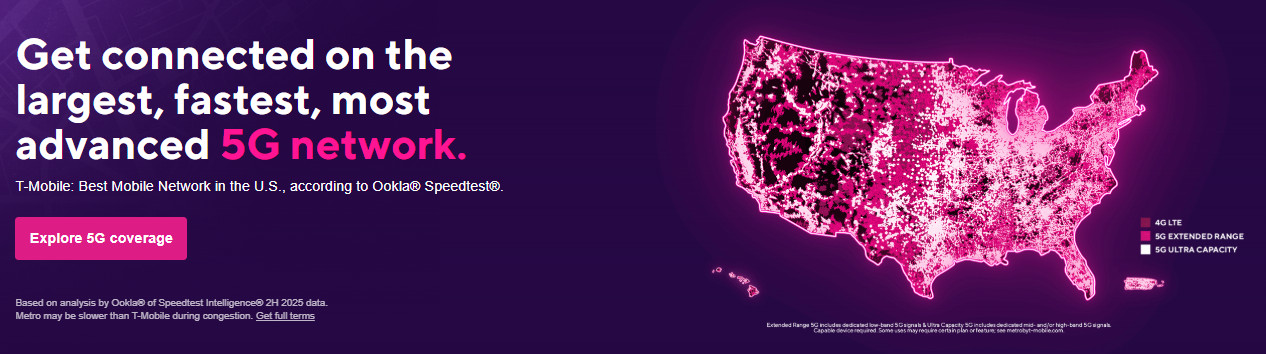
This said, T-Mobile’s ultra-fast 5G variant (5G Ultra Capacity) isn’t available everywhere throughout the USA at the moment. Some areas may rely on Extended Range 5G or even 4G LTE, so I encourage readers to check Metro’s coverage map and run their own tests before subscribing.
Metro by T-Mobile Pricing
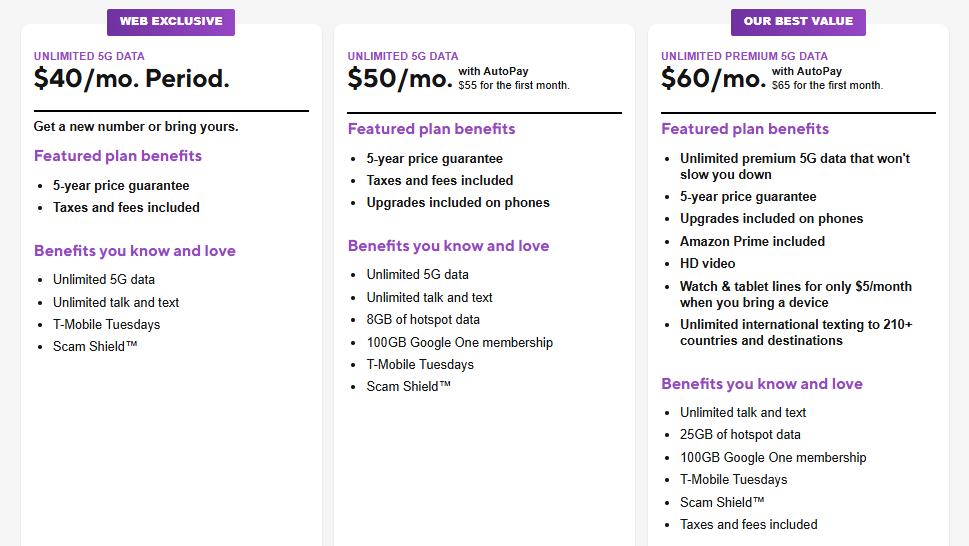
As of May 2026, Metro offers three core single-line pricing plans.
The ‘Unlimited 5G for $20’ offer I mentioned earlier only applies if you pay upfront for 6 months ($120 total).
There are also web-exclusive ‘Bring your phone’ offers starting at $30/month ($35 for the first month). These let you keep your existing number, so are useful if you want to switch plans using your existing handset.
Otherwise, the pricing tiers are as follows:
$40/month (web exclusive)
This plan includes unlimited talk, text, and 5G data. Speeds may slow down once users consume more than 35 GB of data during peak times of network congestion.
Metro claims typical download speeds of 79 – 357 Mbps, which is sufficient to stream video at SD quality.
However, this tier doesn’t include any hotspot data.
$50/month ($55 for the first month)
This plan increases your data priority threshold from 35 GB to 50 GB, so your traffic isn’t at risk of being deprioritized until you reach this limit.
It also includes unlimited 5G, talk, and text with 8 GB of hotspot data. Metro claims typical download speeds of 127 – 455 Mbps, and stream videos in SD.
This tier also includes 100GB of Google One cloud storage. You can also upgrade after 12 months when you trade-in, to get the same deals as new customers on select phones on up to 4 lines, subject to certain restrictions.
$60/month ($65 for the first month)
This was the plan I chose, mainly because it retains the ‘premium’ data experience, so there’s no ordinary monthly premium-data cap before traffic deprioritization.
This plan also includes the above-mentioned 100 GB of Google One cloud storage, as well as Amazon Prime membership.
You can upgrade on the same terms as the mid-tier pricing plan, and stream videos in HD.
The tier also includes unlimited texting to 210+ countries and destinations for no extra charge, as well as 25 GB of hotspot data.
Multi-line Pricing
If you’re signing up for Metro with someone else, this can bring pricing down significantly compared to subscribing individually.
For example, the baseline plan of $40/month costs $65 per month for two lines, $90 for three, and $100 for four, offering potential savings of up to $15 (37.5%) per month, per person.
Online device activation is free, but most plans charge a one-off fee of $25 for in-store activation.
Metro by T-Mobile Benefits and Offers
As we’ve learned, certain Metro pricing plans come with certain benefits, such as 100 GB of Google One and/or Amazon Prime membership.
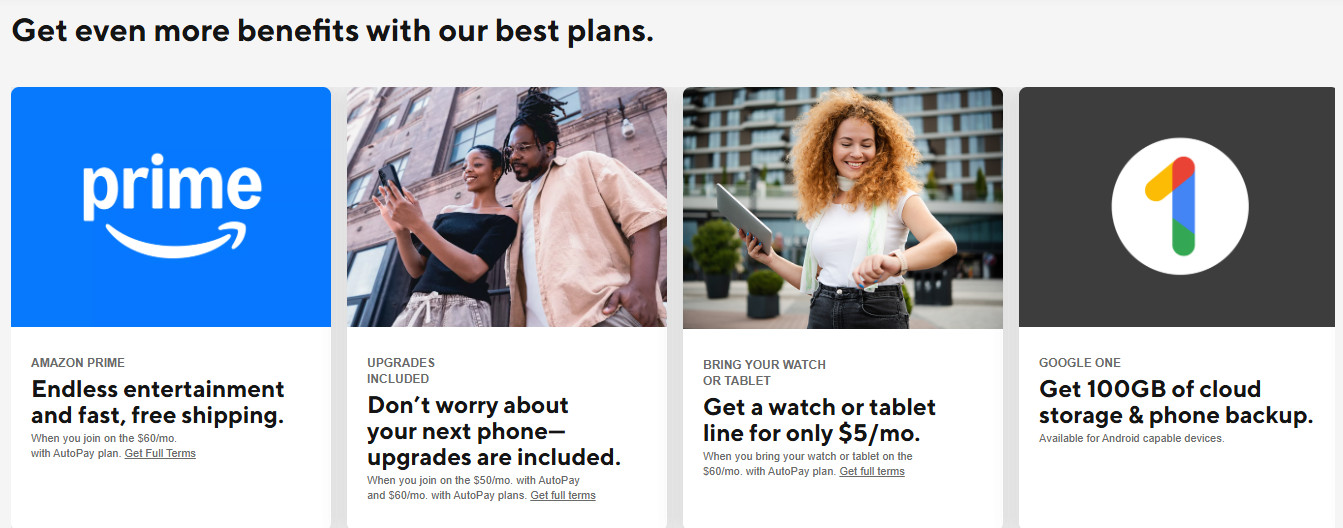
Some of these perks are quite solid, while others may not be as useful to you. These include:
T-Mobile Tuesdays
This gives eligible Metro customers access to weekly benefits through T-Mobile Tuesdays, available via the myMetro app.
It includes rotating perks, like dining rewards, Shell fuel price reductions, discounted movie tickets, monthly Slurpees, and even discounted tickets for certain concerts and live events.
The exact perk and the level of discount you receive change fairly regularly, so you’ll need to keep a close eye on the app or the main site to understand exactly what you’ll receive, but some of these are genuinely useful, such as getting $0.10 off per gallon at certain Shell stations. Not all benefits apply equally to all plans, so you’ll also need to check the fine print.
Scam Shield
As a cybersecurity journalist, I think it’s great when telecom providers take customer security seriously. This free app is included with all Metro subscriptions and, in theory, gives users greater control through anti-scam protections such as Scam ID, Scam Block, and Caller ID.
It’s good to know this is an option, though obviously you can’t just rely on an app to screen out all potentially dangerous calls. There’s also a risk of false positives, in that people you know may not be able to get through if you activate ‘Scam Block’. Still, there’s no requirement to install Scam Shield when subscribing to Metro plans.
Amazon Prime
As I mentioned, this is a perk that comes with subscribing to the highest Metro pricing tier ($60/month). I wanted to delve into this in more detail, as currently Prime membership costs $14.99 per month.
This means if you already pay monthly for Prime membership and are trying to decide between Metro’s $50/month and $60/month plans, you’ll effectively be $4.99 ahead if you choose the more expensive one, all other things being equal.
Metro by T-Mobile Hotspot Essentials
While Metro’s phone plans advertise ‘unlimited 5G,’ that does not mean unlimited hotspot use: tethering has a separate allowance, where included.
This is important if, like me, you regularly tether your cell phone to your laptop for work, as the baseline Metro price plan ($40/month) doesn’t include hotspot data.
The $50/month plan offers 8 GB per month of hotspot data, and the $60/month plan provides 25 GB per month.
Once you use the included hotspot allowance, you should expect hotspot use to be restricted or require additional data, depending on the plan terms and any available add-ons.
Prices are currently $5/month for an extra 2 GB, $10/month for an extra 5 GB, and $20/month for an extra 10 GB.
If the $60 plan’s 25GB hotspot allowance can be combined with a one-time 10GB add-on, that would give 35GB for the month, but I could not confirm a hard monthly maximum from Metro’s public plan pages.
Metro by T-Mobile Device Financing Options
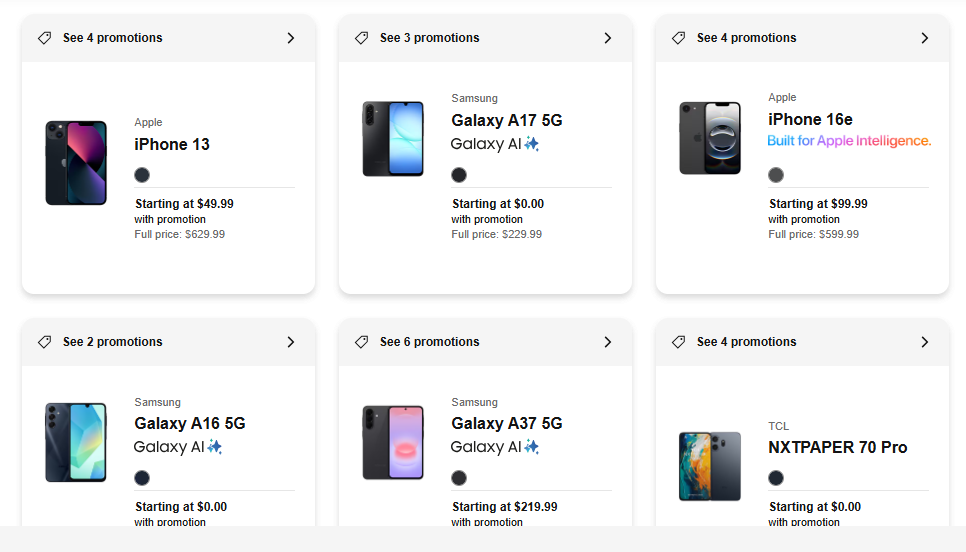
Device financing for Metro is currently handled through Affirm. Eligible customers have options for four interest-free bi-weekly payments or longer monthly installments at 10 – 36% APR, depending on your creditworthiness.
There’s no postpaid-style credit check for basic port-in offers, though it seems that device financing through Affirm is subject to an eligibility check
The Metro Flex program is a loyalty-based upgrade system for prepaid users. After twelve months on a qualifying plan, you can trade in your working phone and become eligible for the same deals as new customers on select devices. But the exact offer may be free or discounted depending on the device and promotion. This is included as part of the mid ($50/month) and premium ($60/month) prepaid plans.
New Flex customers who decide to port in may also get a new device, depending on the pricing tier.
Metro by T-Mobile: Final Verdict
Metro is one of those rare prepaid plans that achieves the trifecta of reliable network quality, genuine perks, and plan simplicity. Its terms and conditions are clearly outlined, and I didn’t get hit by any hidden charges.
For domestic users in cities and suburbs that enjoy T-Mobile’s 5G coverage, it’s hard to find better value than the $50/month or $60/month tiers, particularly when you factor in benefits like Google One and Amazon Prime membership.
The only cause for pause is if you’re a heavy hotspot user, as the 8 GB or 25 GB data caps will likely bite. If you regularly travel outside North America, you’ll also likely need another solution to stay online.
Still, if you want a solid, affordable, prepaid plan backed by one of the largest 5G networks in the USA, then Metro by T-Mobile is an excellent place to start.