


Last Updated on June 22, 2026 by Ewen Finser
Creating step-by-step documentation manually is slow, repetitive, and difficult to scale. Tools like Guidde and Scribe solve this by automatically recording your workflow and turning it into structured guides with screenshots and instructions.
Both platforms can save you hours when building SOPs, onboarding materials, or how-to content. I really like Scribe’s intuitive editing interface and easy-to-use features, but Guidde’s advanced customizations and the ability to record videos also make it very appealing.
Since you don’t need both, it’s best to choose based on how you work and what kind of documentation you need to produce.
Choose Guidde if you want video documentation, advanced customization, and scalable branded content.
Choose Scribe if you want simple, accurate text and image guides with minimal editing.
Both tools automate documentation, but they serve different workflows. Guidde is better for multimedia content and branding. Scribe is better for simplicity and accuracy.
Guidde vs. Scribe – At-a-Glance
Price | Browser Extension? | Desktop App? | Formats | |
GUIDDE | YES | YES | Video Text + image | |
SCRIBE | $23 / $60* month | YES | YES | Text + image only |
Both tools follow a similar core workflow. You record a process, and the platform automatically generates a step-by-step guide with screenshots and written instructions.
The difference is in how far that automation goes.
Guidde extends beyond static documentation by turning those same steps into a polished video with AI-generated voiceover. Scribe focuses entirely on clean, text-and-image guides without adding video into the mix.
For some of you, that may be a deal breaker. If you want to create videos, pick Guidde. However, if you’re only concerned with text-and-image documentation, your decision is likely to come down to which platform best suits the way you work.

Guidde puts it ALL together for me. I've used many screen recording tools (like Loom). I've used many SOP buiding tools (like Trainual). But Guidde puts the best of both together for a quick, easy to use mixed media documentation builder in one (less expensive) workflow. A small, but signficant (compounding) time saver in our business.
To show you what I mean, let’s open up each app and dive into the details.
Guide vs. Scribe – Detailed Comparison
1. Ease of Use
Both Guidde and Scribe are easy to use. Scribe has a simpler interface with fewer features, which makes it quicker to learn and easier to navigate from the start.
Guidde includes more advanced functionality, so there are more tools to get familiar with. This can make Guidde feel slightly overwhelming at first, but the learning curve is short, and most users will be comfortable after a few uses.
Basically, Scribe is easier to pick up, but Guidde offers more flexibility once you are familiar with the interface.
2. Capture Process
I’m just going to come right out and say it:
I hate what Scribe does to my screens when I use it to capture a new workflow.
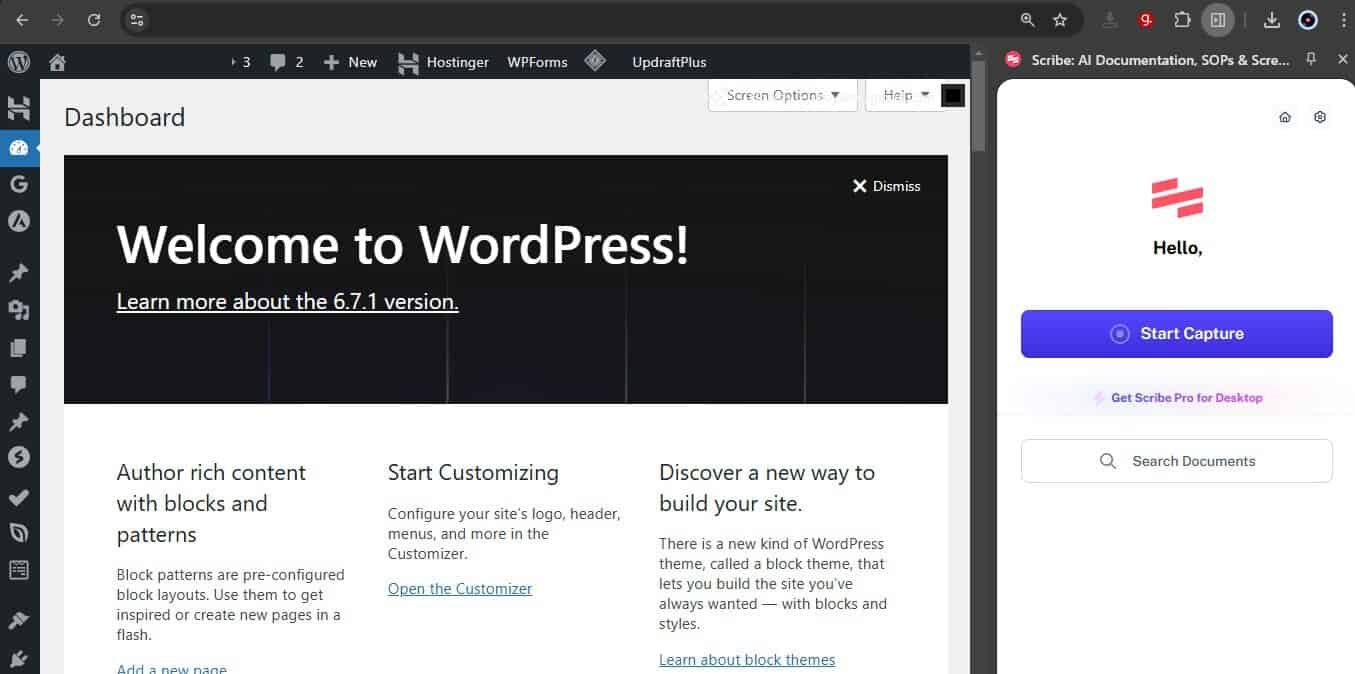
Tap on the extension icon, and the app takes over a big chunk of your screen. The first time I used it, I thought this would minimize once I started recording, but no, there it stays for the entire recording.
Personally, this is a big turn-off. It makes my workspace smaller and in some cases, necessitates awkward horizontal scrolling on tools where it’s just not necessary. By doing so, it makes whatever tool I want to record a little less intuitive.

I much prefer Guidde, which overlays a much smaller control panel that lets you start recording before the controls tuck themselves away neatly in the corner.
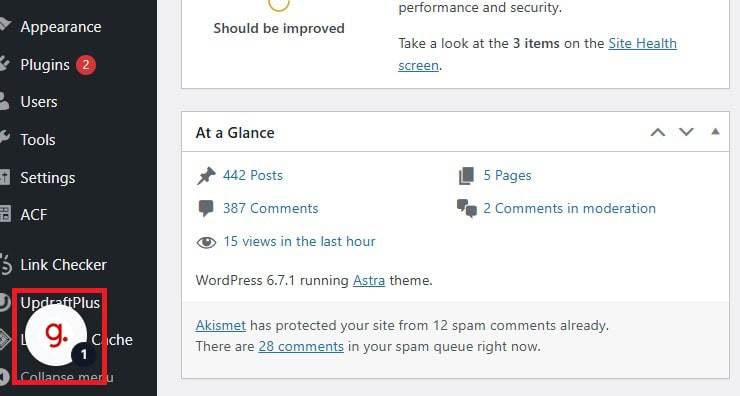
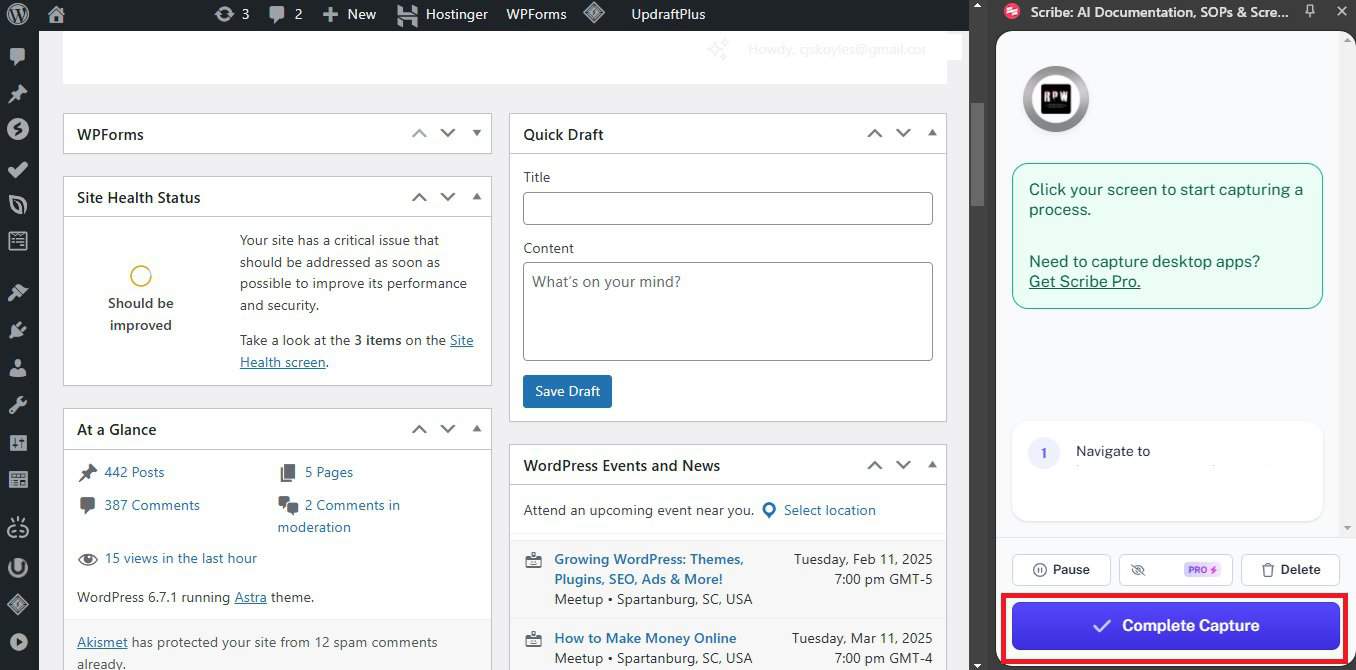
But, I can see how some people may prefer the way Scribe does things. At least when the ‘Complete Capture’ button consistently dominates your screen, you’re never in any doubt as to where you need to click once you’re finished.
Yet with Guidde, the controls are so well-hidden away and unobtrusive that it takes a little getting used to before you intuitively know where to click.
Even still, I’d rather take a few extra seconds to find the Guidde icon at the bottom of my screen than have Scribe negatively impact my user experience.
3. Documentation Quality
Now comes the real question: How good is the documentation that each tool produces?
For the sake of this tutorial, I recorded the same process (creating a new page in Notion) with each tool.
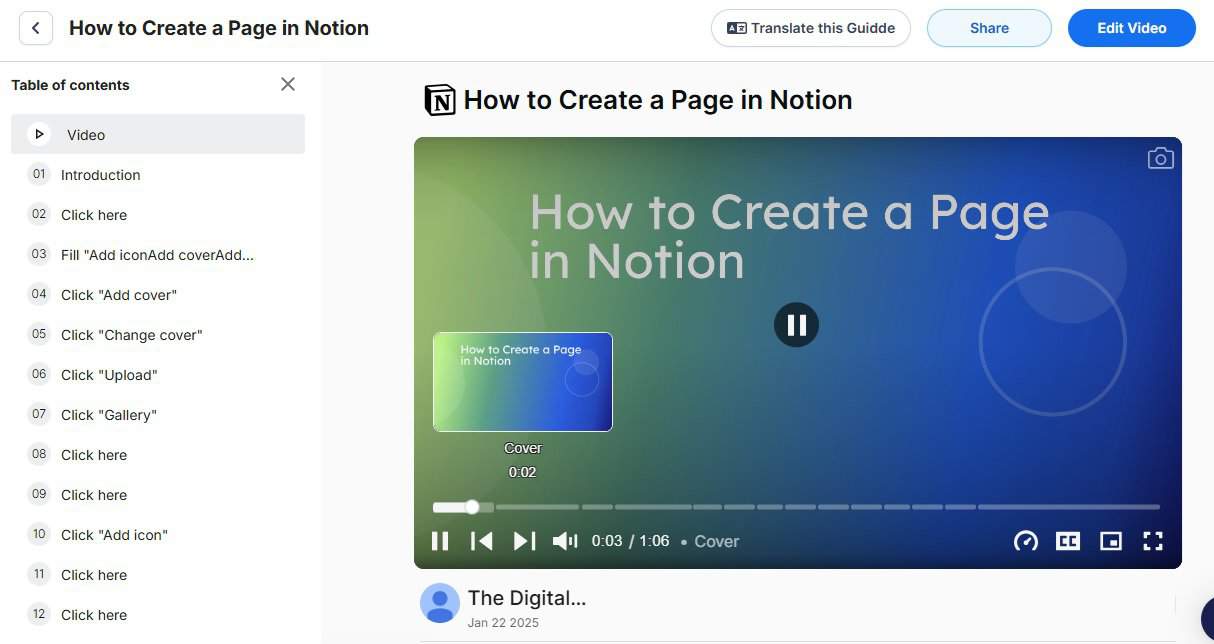
Video Output
- Guidde: Generates a complete video with annotations and AI voiceover
- Scribe: Does not support video
Obviously, the big advantage that Guidde has over Scribe is that it’s the only one of the two to generate a video of your process.
Guidde’s video output is polished enough (with a little editing, of course) to share with users. This makes it a strong choice for onboarding, tutorials, and support content where visual guidance matters.
Text & Image Documentation
- Scribe: Consistently produces clear, reliable steps with minimal errors
- Guidde: Occasionally generates incorrect or unnecessary steps
Still, let’s say that you’re not interested in video and just want good, old-fashioned text and image tutorials. Both are fairly equal in terms of aesthetic appeal, though Guidde’s default annotation style is more in keeping with the way I usually present screenshots.
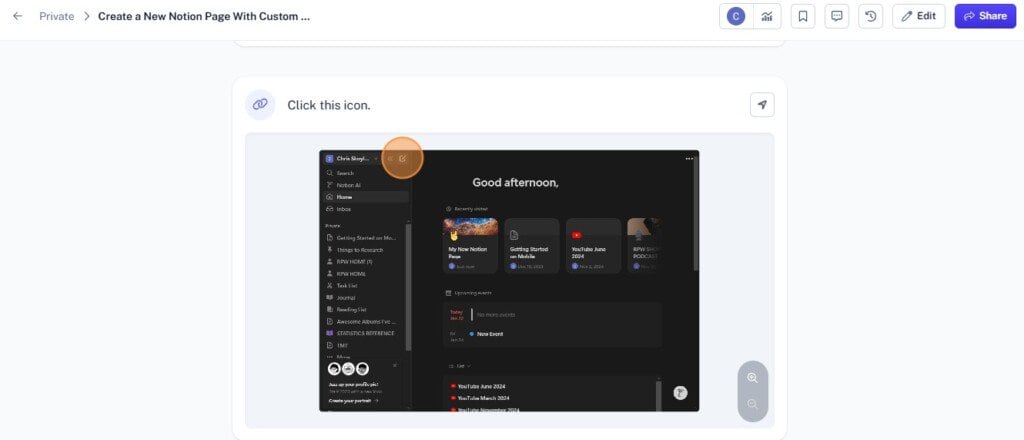
However, where Scribe actually triumphs is that it’s far less error-prone.
Scribe rarely (if ever) produces erroneous steps filled with what your average user would perceive to be, quite frankly, gibberish. As you’ll see in the screenshot below, Guidde does, and it does so with some regularity.
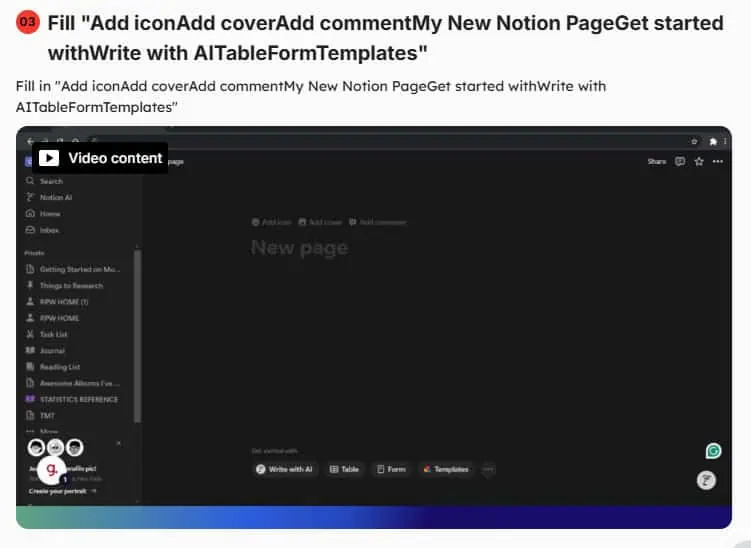
Of course, this isn’t necessarily a deal-breaker. It’s easy enough to simply delete these missteps, but that adds an extra inconvenience to a process that is supposed to be making things easier.
4. Editing
Both platforms give you the freedom to change up your text and screenshots to better reflect your brand’s style and tone.
Of the two, Scribe’s editing interface is slightly more simplistic, but that’s not necessarily a bad thing. It creates a smooth, intuitive interface through which you can:
- Change the style and color of on-screen annotations
- Edit text
- Manually blur out sensitive information (such as log-in details)
Guidde offers all of that along with a drag-and-drop video editor, which, although it feels a little cramped at times, is packed with useful customization that let you turn generic videos into vibrant brand assets.
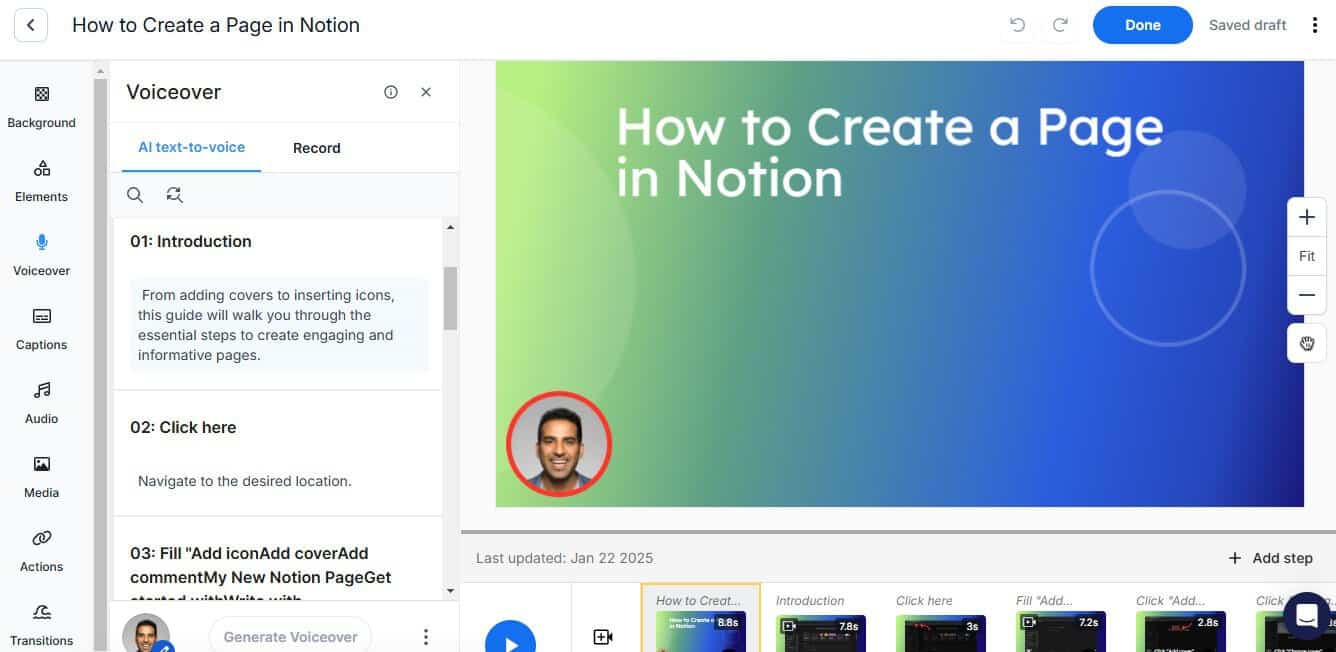
For example, you can:
- Use text-to-speech tools to edit the auto-generated narration
- Change the style and tone of your voice over.
- Add music, animations, and transitions from Guidde’s stock library
- Change video backgrounds and colors
5. Price
Scribe is generally less expensive than Guidde, which reflects its more focused feature set.
- Scribe Pro Personal: $23 per month for individuals or small teams
- Guidde Business Plan: $39 per month (annual) for full feature access
Both plans include core functionality such as screen capture, editing tools, and brand customization.
To go beyond the basics with Guidde, you need the $39/month Business Plan, which includes:
- Access to media elements like music and visual enhancements
- Video generation from recorded workflows
- Drag-and-drop video editing
- Text-to-speech voiceover tools
Other Plans and Pricing Considerations
Scribe and Guidde structure their pricing differently, which makes direct comparisons less straightforward.
- Scribe Pro Teams: $12 per user per month, with a minimum of five users, bringing the total to about $60 per month
- Guidde Pro Plan: $19 per month (annual), but does not include advanced features like engagement insights or text-to-voice
This means pricing is not just about the monthly cost. It depends on team size and which features you actually need:
- Scribe: Lower cost for teams, but limited to text and image documentation
- Guidde: Higher cost for full features, but includes video, voiceover, and more advanced tools
If your priority is keeping costs low, Scribe is the more budget-friendly option, especially for teams. But, if you want video and richer content capabilities, Guidde offers more value despite the higher price.
Personally, I want those video editing tools, so I’m happy to pay a bit more to Guidde to use them.
Guidde vs. Scribe – What is the Best Documentation Tool to Use?
Even with all that Scribe has to offer, I still ultimately chose Guidde.
Yes, Scribe is very easy to use and a solid choice for quickly creating walkthroughs and other documentation, but the way those capture controls took up a big portion of my screen was really off-putting.
After all, using one tool shouldn’t impact the usability of another tool. Scribe does that, Guidde doesn’t.
Besides, even though it costs a few dollars more per month, the fact that I can generate a video at the same time as my screenshots and text copy without any extra effort makes Guidde a win in my book.
Guidde puts it ALL together for me. I've used many screen recording tools (like Loom). I've used many SOP buiding tools (like Trainual). But Guidde puts the best of both together for a quick, easy to use mixed media documentation builder in one (less expensive) workflow. A small, but signficant (compounding) time saver in our business.